






“Globalement, le MelGeek O2 offre une expérience de frappe agréable qui combine la vitesse et la fluidité d'un clavier mécanique avec la commodité et la compatibilité attendues par les utilisateurs de Mac. ”
@Nicholas Calderone




Explorez notre guide d'achat pour trouver votre clavier MelGeek parfait.

Consultez notre section FAQ ou contactez-nous directement : nous serons heureux de vous aider.
Couleur:
Option:
Quantity


Explorez notre guide d'achat pour trouver votre clavier MelGeek parfait.
Consultez notre section FAQ ou contactez-nous directement : nous serons heureux de vous aider.
“Globalement, le MelGeek O2 offre une expérience de frappe agréable qui combine la vitesse et la fluidité d'un clavier mécanique avec la commodité et la compatibilité attendues par les utilisateurs de Mac. ”
@Nicholas Calderone

“J'ai testé de nombreux claviers dans ma quête du meilleur clavier pour une utilisation quotidienne sur mon espace de travail, et bien que beaucoup s'en approchent, le O2 de MelGeek remporte la palme. ”
@Brian Patterson

“Si vous envisagez de remplacer votre Magic Keyboard, le clavier O2 pour Mac pourrait être une excellente option. Proposé par MelGeek à un prix compétitif, il pourrait s'avérer le meilleur choix pour certains utilisateurs. ”
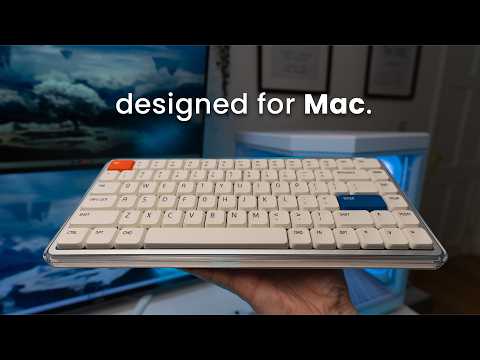
Dans le monde numérique trépidant, MelGeek est convaincu que la technologie doit être à la fois efficace et source de sérénité. Conçu pour l'utilisateur Apple moderne, le clavier O2 (pour Mac) s'intègre harmonieusement à votre configuration minimaliste tout en affirmant un style unique, pour une expérience d'utilisation optimale.

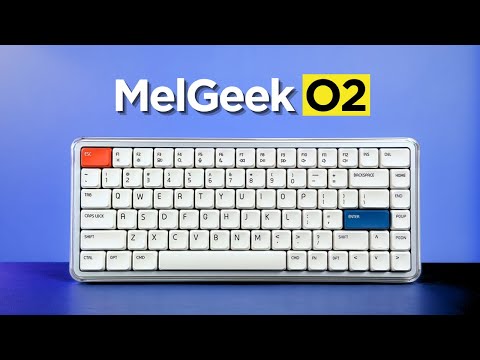
Pur, léger et essentiel. L'O2 (pour Mac) capture l'essence de l'air grâce à sa monture ultra-transparente et son élégant fond blanc, alliant avec art finitions satinées et brillantes.
Cela crée une présence visuellement riche et rafraîchissante qui s'accorde parfaitement avec l'esthétique épurée de votre MacBook, égayant votre bureau et votre flux de travail.

Le MelGeek O2 (pour Mac) est conçu spécifiquement pour les utilisateurs de Mac, offrant une expérience fluide qui reproduit chaque détail du clavier de votre MacBook, de son design élégant à son intégration système intuitive.
Chaque aspect, de la disposition des touches et des zones fonctionnelles aux raccourcis FN et aux coins subtilement arrondis des touches, est méticuleusement assorti pour assurer une transition naturelle et fluide entre vos yeux et vos doigts.

Profitez d'un confort et d'un contrôle accrus grâce aux touches PBT de MIA, conçues pour les commutateurs à profil bas, avec une surface plus large, un toucher soyeux et une durabilité exceptionnelle.

Créez l'ambiance idéale pour votre espace de travail grâce à un double éclairage latéral d'ambiance et un rétroéclairage dynamique, offrant 16 millions de couleurs RGB. Personnalisez facilement les modes d'éclairage (respiration ou statique) via Hive 2. 0 et transformez instantanément votre bureau grâce à un éclairage immersif qui crée l'ambiance souhaitée.

La disposition intelligente à 83 touches conserve toutes les fonctions essentielles dans un format compact, libérant ainsi un espace précieux sur le bureau.

Son profil mince et ses bords légèrement arrondis sont conçus pour un confort ergonomique, garantissant une expérience de frappe naturelle et sans fatigue, même lors de longues sessions.


Le casque MelGeek O2 (pour Mac) est conçu pour une expérience sensorielle exceptionnelle. Grâce à son joint d'étanchéité et à son interrupteur exclusif, son système acoustique et de suspension avancé vous offre un confort perceptible et un son que vous apprécierez au quotidien.


Co-développé par KAILH, le commutateur Sunshine transparent avec tige orange offre une sensation linéaire légère et fluide ainsi qu'un son doux et feutré, idéal pour le travail et les études. Compatible avec plus de 95 % des S-claviers mécaniques de taille standard (à l'exclusion des commutateurs magnétiques) .
Sons de frappe O2 (pour Mac)

Doté d'un chipset Nordic haute performance et d'un taux d'interrogation ultra-rapide de 1000 Hz, O2 (pour Mac) garantit une saisie ultra-rapide et sans latence, offrant une expérience de frappe véritablement native aux utilisateurs avancés.
Prêt à l'emploi dès sa sortie de l'emballage, le clavier O2 (pour Mac) offre une saisie fluide, des raccourcis intuitifs et des commandes multimédias : aucune période d'apprentissage n'est nécessaire. Basculez instantanément entre huit appareils, de votre MacBook à votre iPad et iPhone, pour une fluidité optimale sur macOS, Windows et autres systèmes d'exploitation.
Pour ceux qui apprécient à la fois l'esthétique et la productivité, O2 (pour Mac) est le clavier véritablement natif qui apporte parfaitement l'expérience Mac à votre bureau et au-delà.


Doté d'une batterie de 2500 mAh, l'O2 (pour Mac) est conçu pour suivre votre rythme de travail sans nécessiter de recharges constantes.


Overall rating: 4.8 / 5 from 109 reviews.

La experiencia con este teclado ha sido excelente. Su perfil bajo permite escribir con gran comodidad, mientras que el sonido de las teclas resulta muy agradable. Además, cuenta con un diseño atractivo y ofrece distintas opciones de configuración. Tengo varios teclados mecánicos, incluidos algunos de Apple, pero considero que este es el que ofrece la mejor experiencia en cuanto a diseño, comodidad y sonido.

Exceptional build quality, incredible sound and feel. The best low profile keyboard so far.

I couldn’t be happier with the MelGeek O2 . From the moment I started using it, it was clear that this is a thoughtfully designed, premium product. The build quality is outstanding… solid, well-balanced, and with a finish that feels both durable and refined. Typing on it is an absolute pleasure. The key feel is smooth, responsive, and satisfying without being overly loud, making it perfect for both focused work and everyday use. What really stands out is the attention to detail. Everything from the layout to the overall ergonomics feels intentional and well-executed. It’s comfortable to use for long periods, and it genuinely enhances the typing experience rather than just getting the job done. I also appreciate how seamlessly it fits into a clean, modern workspace. It’s not just a functional tool… it’s something you actually enjoy having on your desk. Overall, I’m extremely pleased with this keyboard. It strikes an excellent balance between performance, aesthetics, and comfort. Highly recommended for anyone looking to upgrade their setup.

Nice typing keyboard, very smooth and with a nice sound. The keys require a tad bit more force to press to my liking, but it is still great to type on.

No complaints 10/10

This keyboard is a work of art, love how quiet and comfy the switches are! Totally recommended!

I’ve been using the MelGeek O2 low-profile mechanical keyboard, and it’s genuinely one of the most comfortable keyboards I’ve typed on. The low-profile design makes a big difference my wrists feel more relaxed, especially during long coding sessions, and there’s noticeably less strain compared to standard mechanical keyboards. The typing experience is smooth and satisfying, with that creamy keystroke sound that’s quiet but still tactile enough to enjoy. It feels premium without being distracting, which really helps when you’re trying to stay focused. The keyboard is also sleek, compact, and well-built, making it perfect for both work setups and everyday use. Overall, the MelGeek O2 strikes a great balance between ergonomics, performance, and aesthetics. If you spend most of your day on a keyboard and care about comfort as much as functionality, this is definitely a solid choice.

Melgeekが得意なポリカボディは質感もあり高級感があります。ポップなデザインでありながら質感が高く満足しています。音質はロープロファイルにありがちなペチペチした音ではなく、ChocV2としては非常に抑制の効いた音です。経験に基づいたよく作り込まれた製品です。

Absolutely excellent keyboard! Throughout the days or week, I will swap keyboards out back and forth since they all have a different feel and sound to them, but I have to say that I get genuinely excited when I reach for the O2. Build quality is top quality, the aesthetics of the board are just beautiful, and the feel is incredible. The gasket mount offers a nice cushioned experience when typing, the switches are buttery smooth and provide a nice tackity-tack when typing. It’s a nice, bright thock that’s pleasant to the ears. RGB is bright and pretty, with the side accents being a nice touch! Magnetic feet are super convenient and the keyboard works well sitting on top of my MacBook Air M4. Connectivity has been solid through Bluetooth, 2.4ghz and wired modes. I like the idea of being able to hot swap this keyboard, but with how nice it is already, I don’t think I would change a thing about this board. The only downside I have to this board is that it cannot be taken apart. I personally have no need to do that, but for the sake of others who wants to add or remove foam, maybe tape mod the board, it’s not possible. Other than that, the board is perfect for me and will continue to be in my lineup going forward. Great job, MelGeek!

ok

Great keyboard. I prefer this typing feel over my magic keyboard. Great tonal sound when typing. Using it to switch between both Mac studio and work laptop now. Please refer to my other review with photo. Very happy with the purchase and build quality. Using it via Bluetooth connectivity and it is very responsive.

I love its design!

My first mechanical keyboard. Low profile which I prefer. Bought this to use with my windows pc but also with mac studio as well. You can switch between profiles very easily. It feels great to type with and has a very comfortable angle to make typing easy. Almost prefer this over my apple magic keyboard for typing feel. I still use the magic however as it has touch id and I am using it with a studio. Would highly recommend the o2 keyboard for macbook users.

best keyboard i've ever used!

Beautiful, elegant, love it!

This is an almost perfect keyboard. Tactiles are great, with a key advance that is close to perfect for a low-profile keyboard. Sound is amazing, buttery, discreet, but still pleasant to hear, and the features are generally great. Navigating the keyboard is easy and intuitive, with no connection problems on a MacBook Pro 14". The only downside is that double or triple input on my W key. It can be pretty annoying, and I am not sure if it will be a production issue that other keyboards will have as well. So far, it has not been a dealbreaker; however, I am not sure if it will become one in the future. Makes it fall from the excellent mark.

The keyboard is nice, feels good to type with and carry around. The keyboard could be better as it has a very low battery life. I feel as though it is running out after an hour or so of using it and starts to stop registering my button presses. It also would be nice to come with a case or bag to hold the keyboard while carrying it around. If there was a space for the usb to be stored within the keyboard it would also add to the fact it’s able to be lightweight and movable. I tend to use it with my MacBook and move from different locations. Otherwise solid keyboard and happy with price.

Honestly awesome. I have the Mojo and hesitated taking it to office but this one works.

Amazing keyboard! Great sound, packaging, and overall experience. And just look how incredible it looks with Work Louder keycaps. I really love it!

Very good keyboard. Smooooothy switches. Love it!

Love it!!

I love the feel of keys and switches out of box. Only issue is brightness keys on F1 and F2 and Fn key does not bring up emoji window. I am sure this can be fixed with firmware. Still I give 5 out of 5 for looks and feel. Lighting is great. I am always pleased with melgeek keyboards. This is coming from someone who has 3 or 4 keyboards from each of the competitors. Melgeek and lofree are my daily drivers.

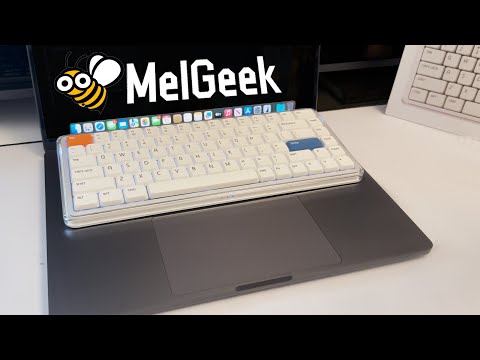
This keyboard works great with a Mac. It’s just slightly bigger than the built-in MacBook keyboard, you can place it right on top without pressing any keys by mistake. Super convenient and comfortable!
Love it!
My best low profile keyboard. I love it!
Beautiful to look at, even more beautiful sounds coming out of it! I own a few low profile keyboards and this has got to be my best one yet out of the box. No flaws so far, from the aesthetics to the typing sound and feel, to the construction quality, to the functionality. No firmware quirks, wakes up from sleep instantly and registers the first key without fault, the space bar is so nicely tuned (better than all my keyboards, including premium ones). I kind find any faults for my use case and preferences.
I wasn't planning on writing a review, but MelGeek insisted I write one, they keep sending me emails. The delivery time was longer than stated, it took such a long time to be delivered. The keyboard itself is okay but trying to administrate the software is hard af, I can't get it to work reliable to work wirelessly. Not only that but the battery percentage appears to be reported incorrectly, the keyboard died but it reported it was at 63% consistently.
The feel, responsiveness and the sound this board makes is just heaven.
great keyboard, killer feature - fast connection after idle period. I had a number of keyboards, and this one is the fastest in terms of awaking time. What is not good, is battery life with active backlight - when it's on, keyboard lives around couple of days only.
Love it!
it's great. wish it had a num pad though
The kind of keyboard I was looking for, soft, cozy sound and very comfortable. The typing experience is actually incredible.
It types nicely. I'm still getting used to mechanical keyboards in general since I switched from a apple magic keyboard
I love the my O2 keyboard. I use it at home and carry it to work. My coworker said it looks cool.
Great keyboard! The typing experience is smooth
Feels great to type on, sounds amazing and works great for me.
I LOVE this keyboard. The aesthetic and versatility are unmatched. Perfect for what I was wanting!
Very nice keyboard only bad thing is that you can't take it apart. 2 switches are slightly scratchy but I could swap them to end or something.
its good
Great keyboard, good height and durable feel.
QUESTIONS FRÉQUEMMENT POSÉES
L'application O2 pour Mac est-elle conçue pour les utilisateurs de Mac ?
Oui, le clavier O2 pour Mac est conçu pour les utilisateurs de Mac qui souhaitent retrouver les sensations d'un clavier externe classique. Son agencement de touches adapté à Mac, ses zones fonctionnelles, ses raccourcis FN et son profil bas facilitent la transition entre le clavier d'un MacBook et celui d'un ordinateur de bureau.
Quelle est la différence entre MelGeek O2 et O2 pour Mac ?
Les claviers MelGeek O2 et O2 pour Mac offrent les mêmes caractéristiques de frappe, de connexion sans fil et de format compact. La principale différence réside dans la disposition des touches : le O2 pour Mac est optimisé pour les utilisateurs qui privilégient l'agencement des touches et les raccourcis clavier propres à Mac.
O2 pour Mac est-il compatible avec Windows ?
Oui, le clavier O2 pour Mac est compatible avec Windows. Son agencement est optimisé pour Mac, mais les utilisateurs Windows peuvent tout de même l'utiliser et ajuster sa configuration grâce aux touches de remplacement fournies.
Le MelGeek O2 est-il confortable pour les longues sessions de frappe ?
Oui, le MelGeek O2 est conçu pour les longues sessions de frappe. La faible hauteur des touches réduit le déplacement des doigts, tandis que les touches MIA PBT, le joint d'étanchéité et l'angle de frappe réglable offrent une expérience de frappe quotidienne plus naturelle.
Ai-je besoin de MelGeek Hive pour utiliser O2 sur Mac ?
Non, O2 pour Mac peut être utilisé pour la saisie de texte classique sans installation logicielle. MelGeek Hive est surtout utile pour réassigner les touches, ajuster l'éclairage, configurer des macros ou mettre à jour le firmware.
Le MelGeek O2 possède-t-il un pavé numérique ?
Non, le MelGeek O2 utilise un format compact à 83 touches et ne possède pas de pavé numérique. Ce format permet un gain de place sur le bureau, mais les utilisateurs qui saisissent des chiffres toute la journée préféreront peut-être un clavier plus grand.
|
Comparison |
| Couleur |
| Nombre de touches |
| Matériau du boîtier |
| Matériau des touches |
| Taux d'interrogation |
| Interrupteur |
| Rétroéclairage |
| Précision RT |
| Zone morte |
| Latence |
| Prix |
|
|
|
Couleur
N/A
|
|
Nombre de touches
N/A
|
|
Matériau du boîtier
N/A
|
|
Matériau des touches
N/A
|
|
Taux d'interrogation
N/A
|
|
Interrupteur
N/A
|
|
Rétroéclairage
N/A
|
|
Précision RT
N/A
|
|
Zone morte
N/A
|
|
Latence
N/A
|
|
Prix
N/A
|

