









“전반적으로 MelGeek O2는 기계식 키보드의 속도와 부드러움에 Mac 사용자들이 기대하는 편리함과 호환성을 결합하여 즐거운 타이핑 경험을 제공합니다.”
@니콜라스 칼데론
“전반적으로 MelGeek O2는 기계식 키보드의 속도와 부드러움에 Mac 사용자들이 기대하는 편리함과 호환성을 결합하여 즐거운 타이핑 경험을 제공합니다.”
@니콜라스 칼데론

“저는 제 작업 공간에 가장 적합한 일상용 키보드를 찾기 위해 수많은 키보드를 테스트해 봤습니다. 많은 키보드가 훌륭했지만, MelGeek의 O2 키보드가 최종적으로 가장 마음에 들었습니다.”
@브라이언 패터슨

“매직 키보드를 바꾸려는 분이라면 맥용 O2 키보드가 최고의 선택지 중 하나가 될 수 있습니다. 멜긱(MelGeek)의 O2는 가격 경쟁력이 뛰어나며, 적합한 사용자에게는 더 나은 선택이 될 수 있습니다.”
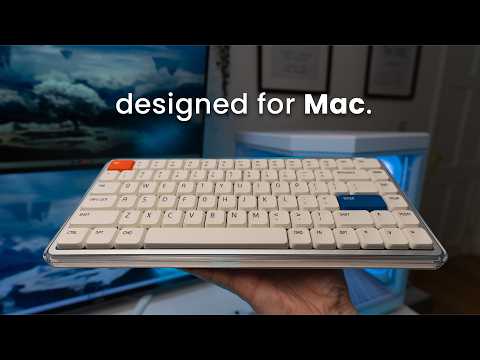
빠르게 변화하는 디지털 세상에서 MelGeek은 기술이 효율적이면서도 마음의 평온을 가져다주는 원천이 되어야 한다고 믿습니다. 현대적인 Apple 사용자를 위해 디자인된 O2(for Mac) 키보드는 미니멀한 환경에 자연스럽게 어우러지면서도 독특한 스타일을 표현하여 모든 조작에 신선한 경험을 선사합니다.

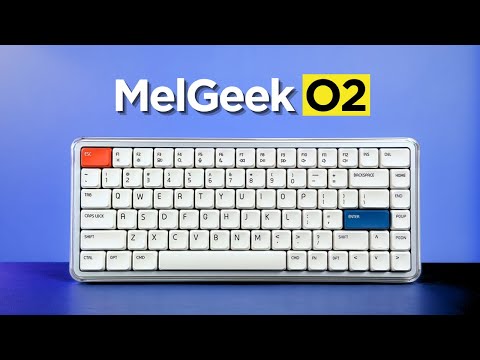
순수하고 가벼우며 본질적인 것. O2(for Mac)는 수정처럼 맑고 투명한 프레임과 세련된 화이트 베이스로 공기의 정수를 담아냈으며, 새틴과 글로스 마감을 예술적으로 조화시켰습니다.
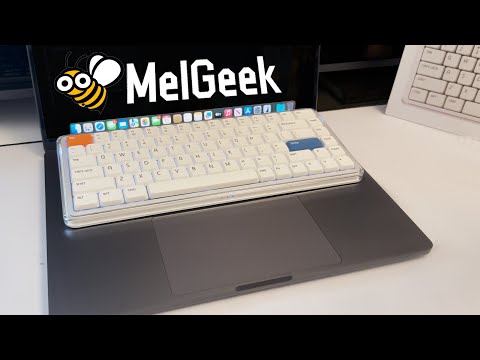
이는 시각적으로 입체적이고 산뜻한 느낌을 연출하여 MacBook의 깔끔한 디자인과 완벽하게 조화를 이루며, 책상과 작업 환경을 한층 밝게 해줍니다.

MelGeek O2(Mac용)는 Mac 사용자를 위해 특별히 제작되었으며, 세련된 디자인부터 직관적인 시스템 통합에 이르기까지 MacBook 키보드의 모든 세부 사항을 그대로 재현하여 완벽한 사용 경험을 제공합니다.
주요 레이아웃과 기능 영역부터 FN 단축키, 키캡의 미묘한 둥근 모서리에 이르기까지 모든 측면이 세심하게 조화를 이루어 눈과 손가락에 자연스럽고 편안한 전환을 제공합니다.

MIA의 PBT 키캡으로 더욱 편안하고 정밀한 조작감을 경험해 보세요. 로우 프로파일 스위치에 최적화된 이 키캡은 넓은 표면적, 부드러운 터치감, 그리고 뛰어난 내구성을 자랑합니다.

듀얼 측면 조명과 생생한 백라이트로 이상적인 작업 공간 분위기를 연출해 보세요. 1,600만 가지 색상의 RGB 효과를 모두 지원합니다. Hive 2.0을 통해 숨쉬기 모드 또는 고정 조명 모드를 손쉽게 선택하고, 몰입감 넘치는 분위기 연출 조명으로 책상을 한층 업그레이드하세요.

지능형 83키 레이아웃은 모든 필수 기능을 컴팩트한 크기에 담아내어 책상 공간을 효율적으로 활용할 수 있도록 해줍니다.

슬림한 디자인과 부드럽게 둥근 모서리는 인체공학적 편안함을 위해 제작되어 장시간 사용하더라도 자연스럽고 피로감 없는 타이핑 경험을 보장합니다.


MelGeek O2(Mac용)는 탁월한 감각적 경험을 위해 설계되었습니다. 가스켓 마운트와 독자적인 스위치를 갖춘 이 제품은 고급 음향 및 서스펜션 시스템을 통해 매일 편안함을 느끼고 만족스러운 사운드를 경험할 수 있도록 해줍니다.


KAILH와 공동 개발한 투명한 선샤인 스위치는 오렌지색 스템과 함께 가볍고 부드러운 선형 키감과 은은하고 쿠션감 있는 소리를 제공하여 업무 및 학습에 이상적입니다. 95% 이상의 키보드와 호환됩니다. S- 크기의 기계식 키보드(자기 스위치 제외).
O2(Mac용) 타이핑 소리

고성능 Nordic 칩셋과 초고속 1000Hz 폴링률을 탑재한 O2(for Mac)는 번개처럼 빠른 지연 없는 입력을 보장하여 고급 사용자에게 진정한 네이티브 타이핑 경험을 제공합니다.
O2(Mac용)는 개봉 즉시 사용 가능하며, 간편한 타이핑, 친숙한 단축키, 미디어 제어 기능을 제공하여 별도의 학습 과정이 필요 없습니다. MacBook, iPad, iPhone 등 최대 8개의 기기를 즉시 전환하여 Mac OS, Windows 등 다양한 운영 체제에서 원활한 작업 흐름을 경험할 수 있습니다.
미적 감각과 생산성을 모두 중시하는 사용자에게 O2(for Mac)는 Mac의 경험을 데스크톱 및 그 외 환경에서 완벽하게 구현하는 진정한 네이티브 키보드입니다.


2500mAh의 대용량 배터리를 탑재한 O2(Mac용)는 잦은 충전 없이도 사용자의 작업 리듬을 유지할 수 있도록 설계되었습니다.


Overall rating: 4.8 / 5 from 109 reviews.

La experiencia con este teclado ha sido excelente. Su perfil bajo permite escribir con gran comodidad, mientras que el sonido de las teclas resulta muy agradable. Además, cuenta con un diseño atractivo y ofrece distintas opciones de configuración. Tengo varios teclados mecánicos, incluidos algunos de Apple, pero considero que este es el que ofrece la mejor experiencia en cuanto a diseño, comodidad y sonido.

Exceptional build quality, incredible sound and feel. The best low profile keyboard so far.

I couldn’t be happier with the MelGeek O2 . From the moment I started using it, it was clear that this is a thoughtfully designed, premium product. The build quality is outstanding… solid, well-balanced, and with a finish that feels both durable and refined. Typing on it is an absolute pleasure. The key feel is smooth, responsive, and satisfying without being overly loud, making it perfect for both focused work and everyday use. What really stands out is the attention to detail. Everything from the layout to the overall ergonomics feels intentional and well-executed. It’s comfortable to use for long periods, and it genuinely enhances the typing experience rather than just getting the job done. I also appreciate how seamlessly it fits into a clean, modern workspace. It’s not just a functional tool… it’s something you actually enjoy having on your desk. Overall, I’m extremely pleased with this keyboard. It strikes an excellent balance between performance, aesthetics, and comfort. Highly recommended for anyone looking to upgrade their setup.

Nice typing keyboard, very smooth and with a nice sound. The keys require a tad bit more force to press to my liking, but it is still great to type on.

No complaints 10/10

This keyboard is a work of art, love how quiet and comfy the switches are! Totally recommended!

I’ve been using the MelGeek O2 low-profile mechanical keyboard, and it’s genuinely one of the most comfortable keyboards I’ve typed on. The low-profile design makes a big difference my wrists feel more relaxed, especially during long coding sessions, and there’s noticeably less strain compared to standard mechanical keyboards. The typing experience is smooth and satisfying, with that creamy keystroke sound that’s quiet but still tactile enough to enjoy. It feels premium without being distracting, which really helps when you’re trying to stay focused. The keyboard is also sleek, compact, and well-built, making it perfect for both work setups and everyday use. Overall, the MelGeek O2 strikes a great balance between ergonomics, performance, and aesthetics. If you spend most of your day on a keyboard and care about comfort as much as functionality, this is definitely a solid choice.

Melgeekが得意なポリカボディは質感もあり高級感があります。ポップなデザインでありながら質感が高く満足しています。音質はロープロファイルにありがちなペチペチした音ではなく、ChocV2としては非常に抑制の効いた音です。経験に基づいたよく作り込まれた製品です。

Absolutely excellent keyboard! Throughout the days or week, I will swap keyboards out back and forth since they all have a different feel and sound to them, but I have to say that I get genuinely excited when I reach for the O2. Build quality is top quality, the aesthetics of the board are just beautiful, and the feel is incredible. The gasket mount offers a nice cushioned experience when typing, the switches are buttery smooth and provide a nice tackity-tack when typing. It’s a nice, bright thock that’s pleasant to the ears. RGB is bright and pretty, with the side accents being a nice touch! Magnetic feet are super convenient and the keyboard works well sitting on top of my MacBook Air M4. Connectivity has been solid through Bluetooth, 2.4ghz and wired modes. I like the idea of being able to hot swap this keyboard, but with how nice it is already, I don’t think I would change a thing about this board. The only downside I have to this board is that it cannot be taken apart. I personally have no need to do that, but for the sake of others who wants to add or remove foam, maybe tape mod the board, it’s not possible. Other than that, the board is perfect for me and will continue to be in my lineup going forward. Great job, MelGeek!

ok

Great keyboard. I prefer this typing feel over my magic keyboard. Great tonal sound when typing. Using it to switch between both Mac studio and work laptop now. Please refer to my other review with photo. Very happy with the purchase and build quality. Using it via Bluetooth connectivity and it is very responsive.

I love its design!

My first mechanical keyboard. Low profile which I prefer. Bought this to use with my windows pc but also with mac studio as well. You can switch between profiles very easily. It feels great to type with and has a very comfortable angle to make typing easy. Almost prefer this over my apple magic keyboard for typing feel. I still use the magic however as it has touch id and I am using it with a studio. Would highly recommend the o2 keyboard for macbook users.

best keyboard i've ever used!

Beautiful, elegant, love it!

This is an almost perfect keyboard. Tactiles are great, with a key advance that is close to perfect for a low-profile keyboard. Sound is amazing, buttery, discreet, but still pleasant to hear, and the features are generally great. Navigating the keyboard is easy and intuitive, with no connection problems on a MacBook Pro 14". The only downside is that double or triple input on my W key. It can be pretty annoying, and I am not sure if it will be a production issue that other keyboards will have as well. So far, it has not been a dealbreaker; however, I am not sure if it will become one in the future. Makes it fall from the excellent mark.

The keyboard is nice, feels good to type with and carry around. The keyboard could be better as it has a very low battery life. I feel as though it is running out after an hour or so of using it and starts to stop registering my button presses. It also would be nice to come with a case or bag to hold the keyboard while carrying it around. If there was a space for the usb to be stored within the keyboard it would also add to the fact it’s able to be lightweight and movable. I tend to use it with my MacBook and move from different locations. Otherwise solid keyboard and happy with price.

Honestly awesome. I have the Mojo and hesitated taking it to office but this one works.

Amazing keyboard! Great sound, packaging, and overall experience. And just look how incredible it looks with Work Louder keycaps. I really love it!

Very good keyboard. Smooooothy switches. Love it!

Love it!!

I love the feel of keys and switches out of box. Only issue is brightness keys on F1 and F2 and Fn key does not bring up emoji window. I am sure this can be fixed with firmware. Still I give 5 out of 5 for looks and feel. Lighting is great. I am always pleased with melgeek keyboards. This is coming from someone who has 3 or 4 keyboards from each of the competitors. Melgeek and lofree are my daily drivers.

This keyboard works great with a Mac. It’s just slightly bigger than the built-in MacBook keyboard, you can place it right on top without pressing any keys by mistake. Super convenient and comfortable!
Love it!
My best low profile keyboard. I love it!
Beautiful to look at, even more beautiful sounds coming out of it! I own a few low profile keyboards and this has got to be my best one yet out of the box. No flaws so far, from the aesthetics to the typing sound and feel, to the construction quality, to the functionality. No firmware quirks, wakes up from sleep instantly and registers the first key without fault, the space bar is so nicely tuned (better than all my keyboards, including premium ones). I kind find any faults for my use case and preferences.
I wasn't planning on writing a review, but MelGeek insisted I write one, they keep sending me emails. The delivery time was longer than stated, it took such a long time to be delivered. The keyboard itself is okay but trying to administrate the software is hard af, I can't get it to work reliable to work wirelessly. Not only that but the battery percentage appears to be reported incorrectly, the keyboard died but it reported it was at 63% consistently.
The feel, responsiveness and the sound this board makes is just heaven.
great keyboard, killer feature - fast connection after idle period. I had a number of keyboards, and this one is the fastest in terms of awaking time. What is not good, is battery life with active backlight - when it's on, keyboard lives around couple of days only.
Love it!
it's great. wish it had a num pad though
The kind of keyboard I was looking for, soft, cozy sound and very comfortable. The typing experience is actually incredible.
It types nicely. I'm still getting used to mechanical keyboards in general since I switched from a apple magic keyboard
I love the my O2 keyboard. I use it at home and carry it to work. My coworker said it looks cool.
Great keyboard! The typing experience is smooth
Feels great to type on, sounds amazing and works great for me.
I LOVE this keyboard. The aesthetic and versatility are unmatched. Perfect for what I was wanting!
Very nice keyboard only bad thing is that you can't take it apart. 2 switches are slightly scratchy but I could swap them to end or something.
its good
Great keyboard, good height and durable feel.
자주 묻는 질문
O2 for Mac은 Mac 사용자를 위해 설계된 것인가요?
네, O2 for Mac은 맥 사용자에게 더욱 익숙한 외장 키보드 경험을 제공하도록 설계되었습니다. 맥 친화적인 키 레이아웃, 기능 영역, FN 단축키, 그리고 슬림한 타이핑 감촉은 사용자가 맥북 키보드에서 데스크톱 환경으로 전환하는 데 도움을 줍니다.
MelGeek O2와 Mac용 O2의 차이점은 무엇인가요?
MelGeek O2와 O2 for Mac은 핵심적인 타이핑 경험, 무선 연결, 그리고 슬림한 키보드 디자인을 공유합니다. 주요 차이점은 레이아웃인데, O2 for Mac은 Mac 스타일의 키 배치와 단축키 사용 습관을 선호하는 사용자를 위해 최적화되어 있기 때문입니다.
O2 for Mac은 윈도우와 호환되나요?
네, O2 for Mac은 Windows에서도 사용할 수 있습니다. 키 배열은 Mac에 맞춰져 있지만, Windows 사용자도 키보드를 사용할 수 있으며 필요에 따라 포함된 교체용 키캡으로 설정을 조정할 수 있습니다.
MelGeek O2는 장시간 타이핑하기에 편안한가요?
네, MelGeek O2는 장시간 타이핑에 적합하도록 설계되었습니다. 낮은 키 높이는 손가락 이동 거리를 줄여주고, MIA PBT 키캡, 가스켓 마운트, 조절 가능한 타이핑 각도는 더욱 자연스러운 타이핑 경험을 제공합니다.
Mac용 O2를 사용하려면 MelGeek Hive가 필요한가요?
아니요, O2 for Mac은 별도의 소프트웨어 설정 없이 일반적인 타이핑 용도로 사용할 수 있습니다. MelGeek Hive는 주로 키 매핑 변경, 조명 조정, 매크로 설정 또는 펌웨어 업데이트 시에 유용합니다.
MelGeek O2에는 숫자 키패드가 있나요?
아니요, MelGeek O2는 83키 컴팩트 레이아웃을 사용하며 숫자 키패드가 없습니다. 이 레이아웃은 책상 공간을 절약해 주지만, 하루 종일 숫자를 입력하는 사용자는 더 큰 키보드를 선호할 수 있습니다.
| 정보 |
| 색상 |
| 키 수 |
| 케이스 소재 |
| 키캡 소재 |
| 폴링 속도 |
| 스위치 |
| 백라이트 |
| RT 정밀도 |
| 데드존 |
| 지연 시간 |
| 가격 |
|
정보
N/A
|
|
색상
N/A
|
|
키 수
N/A
|
|
케이스 소재
N/A
|
|
키캡 소재
N/A
|
|
폴링 속도
N/A
|
|
스위치
N/A
|
|
백라이트
N/A
|
|
RT 정밀도
N/A
|
|
데드존
N/A
|
|
지연 시간
N/A
|
|
가격
N/A
|

