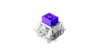
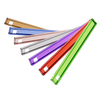
Accessories are optional and priced separately. Discounts, shipping and taxes are calculated in your cart and at checkout. You can edit each item in your cart.
Dimensions: Approx. 330 mm (L) × 140mm (W) × 44 mm (H)
Weight: Approx. 1100 g
Typing Angle: Approx. 6.5°
Connectivity & Compatibility
Connection: Wired (Single-mode)
USB Polling Rate: 8,000 Hz
Supported Systems: Windows, macOS, Linux
In The Box
MelGeek REAL81 Keyboard*1
Warranty card *1
Brand card *1
User manual *1
USB cable *1
Keycap puller *1
Extra keycaps *5
MelGeek bee sticker *1
After Sales Support Policy
Shipping: Enjoy fast, reliable, and trackable global shipping with estimated delivery within 3–5 business days.
Return: Enjoy 30-day hassle-free returns and a 30-day quality guarantee. Refunds are typically processed within 5–7 business days.
Warranty: All magnetic keyboards include a 2-year warranty, while mechanical keyboards, mice, and accessories are covered for 1 year. For any product inquiries or support assistance, please feel free to contact our support team at service@melgeek.com.
Tech Review
Need a Support or Guide?
Explore our Buying Guide to find your perfect MelGeek keyboard.
Unlock your peak with Hall Effect Rapid Trigger. By resetting the key on a dime—with a mere 0.1mm lift—it eliminates the sticky, sluggish delay of traditional mechanical switches. No more ghosting, dead inputs, or dropped combos. Whether you are animation-canceling complex combos or flashing out of enemy ultimates with zero physical latency, you will always strike first.
Dynamic Keystroke
One Key, Four Distinct Actions
One key. Multiple actions. In FPS games, a single keystroke can seamlessly execute complex combos—like equipping and throwing a flash, or instantly toggling between a sprint and a silent walk—triggering up to 4 actions in one smooth motion.
SOCD
Absolute Emergency Stop
When two selected keys are pressed simultaneously, the keyboard only triggers the last pressed key, stopping the other one at the same time. Helping you reposition in the chaotic fog of war and gain absolute control.
The Golden Ratio: Space Meets Ultimate Control
Maximize your combat zone without sacrificing keys. By ditching the dead weight of a full-size board, you unlock massive, unrestricted mouse real estate—giving you the physics-based freedom to execute flawless low-DPI sweeping swipes, 180-degree turnarounds, and aggressive clutch flicks.
The All-Rounder Gaming Keyboard
Keep your essential keys while upgrading your desk space. Retaining the dedicated arrow cluster and F-row ensures maximum compatibility across all genres—giving you instant, muscle-memory control to dominate in Dota 2, League of Legends, CS2, and Fortnite.
Streamlined Efficiency in One Click
Master your workflow without the clutter. By retaining the dedicated F-row and multi-function shortcuts, you can compress complex system commands, media playbacks, and heavy productivity macros into effortless, single-tap inputs.
Intelligent Audio Sync
Powered by the HIVE software for flawless, zero-latency audio-to-visual syncing. The dynamic full-zone backlighting intercepts and processes raw audio signals on the fly at the hardware level—instantaneously transforming every beat, gunshot, and subtle sound wave into a mesmerizing, real-time light show that brings your entire gaming setup to life.
Sync with the Action
Experience deep, real-time integration with Valorant and others. From skill cooldowns and critical kills to match-winning moments, your keyboard reacts instantly to every in-game event. Immerse yourself in the action with 16.8 million vibrant colors that turn your setup into a seamless extension of the game.
Panoramic RGB Showcase
Break free from the shadow of traditional keycaps. Crafted from premium frosted semi-transparent PC keycaps, this chassis completely unleashes your RGB backlighting. It diffuses every lumen across your setup, instantly transforming your entire desktop into a deeply immersive, neon-drenched battle station.
Jellyfish Magnetic Switch
0:00
MelGeek Honey Switch
0:00
Custom Stabilizers
Custom-molded exclusively for our Hall Effect system to deliver next-level structural stability. By completely isolating high-frequency vibrations from heavy bottom-outs, they eliminate rattle and unwanted housing noise while preventing accidental double-triggers caused by switch resonance.
Pure Acoustic Engineering
Featuring an advanced 5-layer acoustic foam gasket mount, this internal architecture completely swallows hollow cavity resonance. It tames harsh frequencies to deliver an incredibly smooth, deep keystroke sound and a premium, cushioned bottom-out feel.
Powerful HIVE Driver
Map keys and configure layouts intuitively with a user-friendly interface, while retaining full tactical control to micro-tune every performance detail.
The Esports Command Center
Fine-tune actuation points globally or per-key. Experience instant inputs on press and zero-latency resets on release, packing elite stopping power and rapid-fire control into every millisecond.
Desktop Aesthetic Extension
Blend your software into your physical setup. Customize backgrounds and floating dynamic alerts to turn your digital interface into a seamless extension of your desktop gaming vibe.
In the Box
Customer Reviews
Overall rating: 5.0 / 5 from 11 reviews.
Simplesmente perfeito... crio conteúdo, e jogo em alto nível no Rainbow 6, e esse teclado e completo para os dois sentidos! Digitacao excelente, som muito agradável e a possibilidade de configurar a quantidade de mm para acionamento da tecla me deixa com controle total dentro do game!! Teclado excelente!!
This is a truly great keyboard when haimu dove quiet switches are added to it, as well as Nuphy Canopus shine through key caps. Some rgb HE keyboards, such as the Hex80 HE keyboard, are not bright enough to work with Canopus shine through key caps (the only good quality polycarbonate south facing keycaps I am aware of) but this one definitely is on the brightest option.
I have compared this keyboard with the $100 more expensive HEX80 keyboard and it is better, not only because of the shine through option but because the software is more comprehensive. For example, with Hex80 I can only do a macro of 8 characters long and have to manually edit the ms delay. With this keyboard the macro can be about 32 characters long and I can either edit the ms delay manually or make it a fixed delay eg 30 ms for all inputs at the click of a button. Plus, I can have macros looping a set number of times or make a "toggle macro" that loops until I repress the key to turn it off. For example, I can create a macro that loops planting seeds in a farming game until I turn it off. This can't be done with the Hex80.
The software is not as intuitive as the Hex80 but once you get used to it, it is pretty easy to use. You just need to remember to click the virtual keyboard after creating DKS etc or otherwise it won't work because it won't have a trigger key (a reminder popup would be helpful here). Setting rgb colours is not as easy as it could be, as dull white keys on the virtual keyboard are active/change colour and bright ones not (but look too similar to each other, a thick boarder around the dull white keys that will change to the selected colour would make it much easier and using dull white instead of bright white to signify active keys is also counterintuitive) and menu labelling is not intuitive (why have calibration and key switch options under rapid trigger menu option).
But these are all minor issues. Tried heaps of HE keyboards and this is the best, including Wooting, which does not even have onboard macros.
My first gaming keyboard. Super responsive and light keys! A few weeks in and I’m still training myself to not accidentally press neighboring keys since with a light tap down, just a couple mm, it registers as a keystroke. I’m aware there’s custom settings (via website rather than downloadable bloatware, somehow, which is nice) to change the activation depth though to prevent accidental keystrokes, and this might also might align better with my old habit of pressing keys hard (as a pianist and a typist who grew up on cheap, flat chiclet keyboards lol).
The HE technology is perfect for rhythm games that require minimal input lag and tight timing precision to play effectively; on ADOFAI my calibration hovered around 75 ms input lag (probably dominated by other components in my PC system which are mid-high tier) and on Bits and Bops my reported input lag was 12 ms. As a result, I’ve been performing with much more consistency and achieving more “Perfect” scores in my rhythm games, even accounting for accidental presses of neighboring keys.
Lastly, the build feels really sturdy, with no deck flex, and unlike the vast majority of keyboards out there, the black/yellow/amber tones of the honey sulfur model was PERFECTLY in sync with my preferred color scheme. Absolutely worth it. I can’t speak for all the advanced customization options available, but from out of the box the purchase is already more than worth it.
Real81 is the real deal! My friend has been using the Real67, and was try it before, and I noticed that can performs much better in games compared with his previous ordinary keyboard. That really made me want to try one myself.
However, I prefer a larger layout for both daily work and gaming, so I chose the Real81. It has a simple but thoughtful design with great details. For now, the Rapid Trigger (RT) settings and gaming configurations are already enough for my gaming needs.
The overall experience has been great so far. If my gaming performance continues to improve in the future, I might upgrade to the Centauri80 or the Made84 V2 (especially if it comes with a similar design).
Really enjoying this keyboard!
In my previous review I criticized that the software does not have a pop up reminder to set trigger keys, for example when setting DKS. But I just tested it out and realized it does this now.
I also criticised the rgb setting software as not being obvious enough, the difference in colour of keys on virtual keyboard that are "active" and will change to the selected colour and those that won't. But looking at it again, the difference between light grey background (will change colour) and white background (won't change colour) is distinctive enough.
Is the MelGeek REAL81 worth it compared to a regular mechanical keyboard?
The REAL81's main advantage is adjustable actuation: each key triggers from 0.1-3.4 mm in 0.01 mm steps, with Rapid Trigger, an 8,000 Hz polling rate, and 0.125 ms response. A regular mechanical keyboard has one fixed actuation point and no analog input. The REAL81 lists at $139.
Is the REAL81 good for typing or just for gaming?
It's great for both. The REAL81 pairs a gasket mount with a 5-layer Poron/silicone dampening system for a deep, clean Hi-Fi typing sound. Set a deeper actuation point (e.g. 1.0-1.5 mm) for comfortable typing, and keep Rapid Trigger on for gaming.
What competitive features does the REAL81 offer for FPS games?
The REAL81 supports SOCD resolution, dynamic keystroke (DKS), and an AD emergency stop. Each key takes a custom actuation point from 0.1 mm, plus a super key for an extra binding layer. You set these per profile in Hive for counter-strafing and combos.
How do I set up Rapid Trigger and actuation on the REAL81?
Open the performance tab in Hive. Set actuation travel from 0.1-3.4 mm and Rapid Trigger from 0.01-2.5 mm, in 0.01 mm steps. Rapid Trigger fires and resets a key as you move it, which suits fast counter-strafing and repeated taps. Keep press and release near 0.2-0.3 mm at first to avoid accidental triggers.
What is the REAL81's case and plate made of?
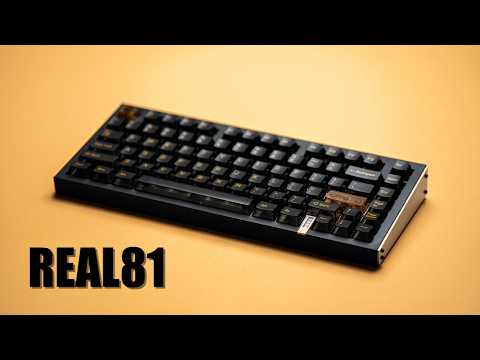
The REAL81 has an ABS and PC case with an anodized silver aluminum plate. It weighs about 1100 g. A gasket mount and a 5-layer foam stack sit inside for a solid feel and a low-pitched sound. The typing angle is about 6.5 degrees.
Can I load pro-player settings onto the REAL81?
Yes. The REAL81 includes ready-made profiles used by the DRG esports team, loaded with one click in MelGeek Hive. You can also create, save, and switch your own per-key profiles. Each one stores actuation depth, Rapid Trigger curves, and key mapping, so you can swap setups instantly.