Shipping: Enjoy fast, reliable, and trackable global shipping with estimated delivery within 3–5 business days.
Return: Enjoy 30-day hassle-free returns and a 30-day quality guarantee. Refunds are typically processed within 5–7 business days.
Warranty: All magnetic keyboards include a 2-year warranty, while mechanical keyboards, mice, and accessories are covered for 1 year. For any product inquiries or support assistance, please feel free to contact our support team at service@melgeek.com.
Tech Review
Need a Support or Guide?
Explore our Buying Guide to find your perfect MelGeek keyboard.
Accessories are optional and priced separately. Discounts, shipping and taxes are calculated in your cart and at checkout. You can edit each item in your cart.
True 8KHz Power: The MADE series delivers a verified 0.125ms ultra-low latency. Benchmarked via professional robotic simulation, we guarantee an average release latency of just 0.42ms. Consistent Performance: Experience relentless, uniform speed across every key, even during the most intense multi-key combos. Dominate the meta.
SOCD
Directional Input Control
Manages conflicting commands like Left/Right or Up/Down. Crucial for fighting games to execute clean combos, and essential for FPS movement to achieve flawless strafing and instant counter-strafing. It ensures your competitive inputs stay sharp, clean, and perfectly predictable.
DKS
Dynamic Keystroke
One key. Multiple actions. In FPS games, a single keystroke can seamlessly execute complex combos—like equipping and throwing a flash, or instantly toggling between a sprint and a silent walk—triggering up to 4 actions in one smooth motion.
END
Single-key Reverse Stop
When you release the first key, it stops the first key andimmediately triggers the second key for a faster stop (commonly used for A/D counter-strafing in CS2).
RS
Rappy Snappy
When both keys are pressed, only the key with the deeper depth is triggered. When both keys are fully bottomed out, both are triggered.
Unlock Lighting Evolution with HIVE
Powered by MelGeek HIVE Driver, your RGB lighting evolves far beyond decoration. It transforms into a high-energy tactical dashboard that syncs seamlessly with your gameplay, lighting up your every victory and clutch moment.
Original Light Bar
Elevate your desk aesthetics with 16 million RGB colors and unrestricted customization. The custom-engineered light bar instantly locks in your competitive vibe, blending vibrant lightscapes to make your creative setup stand out.
PC Translucent Keycaps
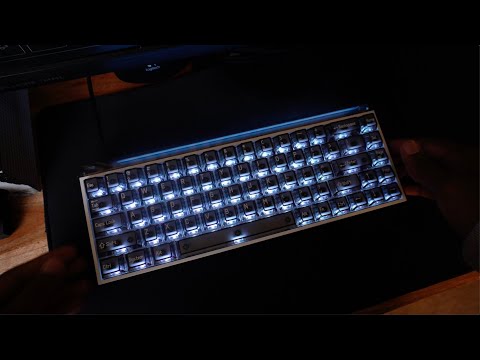
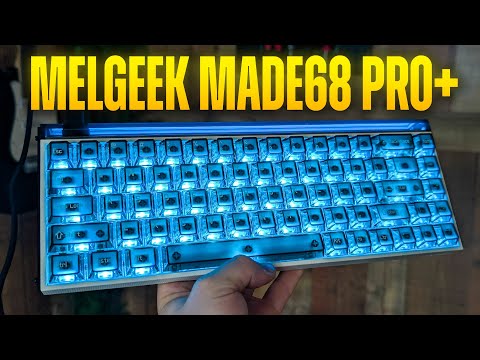
Unleash your setup’s full potential with fully transparent keycaps that allow light to pass through unobstructed. Combined with dynamic lighting presets, it delivers a purer, cleaner, and fully immersive visual feast under your fingertips.
Real-Time Gaming Action Sync
Instantly match lighting effects to in-game hero skills, actions, and announcements for total in-game immersion.
Dynamic Audio Visualization
Transform your audio into a visual spectacle. The full-zone backlight flawlessly captures every frequency—from the heavy thumping of tactical gunfire to high-energy electronic beats. Experience real-time, zero-lag synchronicity that turns every keystroke into an immersive, rhythmic light show.
Personalized AI Glow—Lighting Tailored to Your Style
Let advanced AI generate custom ambient glows perfectly matched to your games and moods.
5-Layer Acoustic Padding
Filters out harsh micro-rattles and isolates vibrations, concentrating every keystroke into a cleaner, purer signature.
Custom-Class Hi-Fi Audio Tuning
Fine-tuned through countless structural iterations to elevate both sound and finger-feedback to custom-keyboard standards.
Premium FR4 Positioning Plate
Delivers high-flex resilience with robust structural support for a satisfyingly crisp, bouncy typing feel that is never mushy.
Pro KOM HE Magneto Switch
The Pro KOM HE Magneto Switches dramatically extend lifespan while delivering ultra-smooth travel and instantaneous response. Every single keystroke instantly translates into your winning instinct.
0:00
PC Transparent Keycaps
The Intelligent dashboard of Your Entire Setup
More than just a control panel, it’s an intuitive command center that seamlessly syncs your hardware, ambient lighting, and performance profiles. It doesn't just manage your gear—it adapts to your passion.
Next-Gen Interface: Stripped-Down Simplicity
By re-engineering complex features like HE tuning, RGB customization, and advanced macros into an intuitive design, fine-tuning your keyboard becomes second nature—even for beginners.
Smart Overlay: Non-Intrusive Global Alerts
Critical updates—device connections, profile switches, hardware diagnostics—appear as lightweight floating bubbles. Stay focused, win without distraction.
Immersive Spaces: Dynamic Ecosystem Wallpapers
Personalize your interface with custom dynamic wallpapers. Blending seamlessly with your physical desk setup and in-game ambiance, every launch of the app is an immersive visual gateway to the future.
Immersive Spaces: Dynamic Ecosystem Wallpapers
Personalize your interface with custom dynamic wallpapers. Blending seamlessly with your physical desk setup and in-game ambiance, every launch of the app is an immersive visual gateway to the future.
MADE68 Pro+ VS MADE68 Ultra+
In the Box
FREQUENTLY ASKED QUESTIONS
How is MADE68 Pro+ different from MADE68 Ultra+?
MADE68 Pro+ is the lower-price 65% MADE keyboard with an ABS + PC case. Its switch lineup includes TTC RGB Sacred Heart Magnetic Switch and King of Magnetic Switch Pro Version. It supports SOCD and 5-layer acoustic optimization, while MADE68 Ultra+ uses an aluminum case and TTC Magnetic Switches.
Is MADE68 Pro+ better for FPS games than a regular mechanical keyboard?
MADE68 Pro+ gives FPS players adjustable magnetic input instead of one fixed mechanical actuation point. It supports 8,000Hz polling, 16,000Hz scanning, 0.01mm RT accuracy, Rapid Trigger, Snap Tap, and a 0.1-3.3mm actuation range. These features help tune movement and reset behavior, but they do not improve aim by themselves.
Does MADE68 Pro+ use an aluminum case or an ABS + PC case?
MADE68 Pro+ uses an ABS + PC case, not a full aluminum case. The formal spec lists an immersion gold FR4 plate, PBT double-shot keycaps, and a 6.5-degree typing angle. This build fits buyers who want MADE68 magnetic performance without the heavier aluminum build of Ultra+ or Centauri models.
Is MADE68 Pro+ comfortable enough for daily typing?
MADE68 Pro+ can handle daily typing, but it is still a 65% gaming layout. Use deeper actuation for letters, space, and modifiers to reduce accidental presses. Berry Pink translucent PC keycaps improve RGB visibility, while MCR profile, magnetic-axis stabilizers, and 5-layer acoustic optimization support typing feel. Choose a larger layout if you need an F-row or numpad.
How much can I customize MADE68 Pro+ after I buy it?
MADE68 Pro+ supports appearance, magnetic input, and HIVE lighting customization, including AI lighting where available in HIVE. Transparent or pink translucent PC keycaps make lighting effects more visible than opaque keycaps. Side panels, light covers, keycaps, and Gateron, Kailh, and TTC magnetic switches support physical customization, but confirm accessory fit before buying.
Are Snap Tap and SOCD safe to use in CS2 or Valorant on MADE68 Pro+?
Snap Tap and SOCD are not always safe because each game, server, and tournament can set its own rules. Valve began kicking CS2 players on official servers for SOCD-style automation in 2024, so disable Snap Tap where rules prohibit it. Valorant policies may differ by event. Rapid Trigger is separate because it follows key movement.
Customer Reviews
Overall rating: 4.9 / 5 from 239 reviews.
I love it, rapid trigger has been game chaging for me in valorant and i love how it feels to type on, only complain is that the sound profile of the keyboard is brighter than what im used to, but i like it :D
Honestly the best keyboard you could get ever, the design is really appealing, quality control is great, rapid trigger works better than any other keyboards In the price range
Love this keyboard! Will definitely buy from them again. Only disappointment isn’t product related but lack of interest in their customers that are creating and sharing content about their product is a bit disappointing. It’s nice to feel valued with at least a like from time to time.
Overall amazing keyboard. No adjustable feet, but it's already at a good height. The keys feel great and responsive. They're more on the 'clacky' side. Wish it came with a plastic keyboard cover. The website to configure the actuation, rapid trigger, snap tap etc. was easy to use and worked with no issues.
Just had a couple issues:
1. The 'A' key would sometimes stop working when switching profiles. I had to unplug and plug in back the cable to get it working again.
2. The plastic around the lightbox is susceptible to micro scratches.