









Great keyboard well priced and premium feel
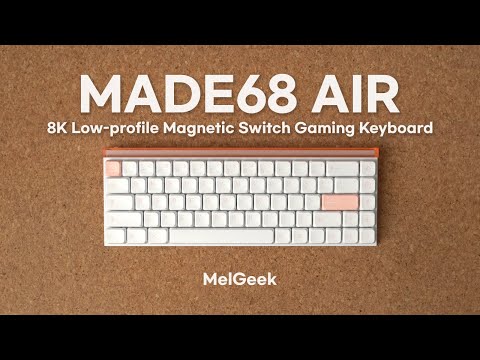
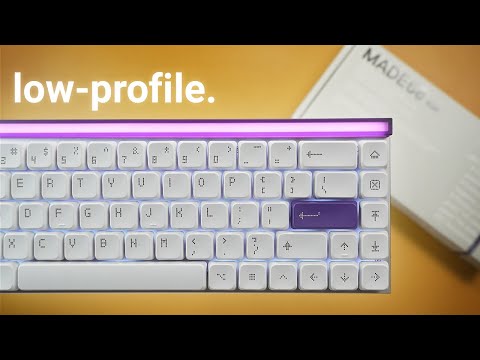
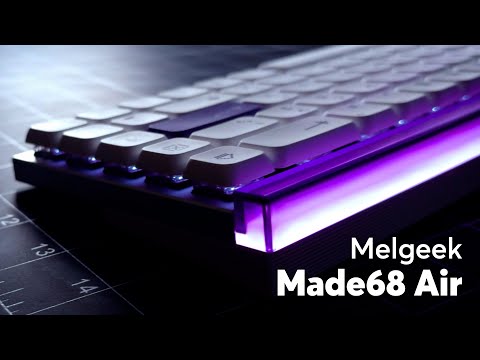
MelGeek의 최고급 올 알루미늄 로우 프로파일 마그네틱 키보드입니다. "MADE" 모듈형 디자인과 짧은 키 스트로크의 스위치가 만나 번개처럼 빠른 반응 속도를 자랑합니다. 단순한 키보드가 아닌, 한층 더 향상된 게임 및 타이핑 경험을 선사합니다.


다양한 게임 간의 빠르고 원활한 전환을 손쉽게 즐겨보세요.

Made68 Pro를 선택하시면 미래에 투자하는 것입니다. 저희만의 독점적인 엔드 투 엔드 솔루션을 기반으로 제작되어 누구보다 빠르게 혁신할 수 있는 역량을 제공합니다. MelGeek의 자체 소프트웨어인 Hive를 통해 완벽한 개인 맞춤 설정을 경험해 보세요. 11년 이상 개발된 MelGeek의 자체 소프트웨어입니다. 업계 최고의 WiN+ 최적화 기능과 적응형 홀 보정 기능을 통해 흔들림 없는 안정성을 보장합니다. 새롭게 디자인된 Hive 소프트웨어는 간편한 사용자 맞춤 설정을 제공하며, 곧 프로 플레이어 수준의 설정을 적용할 수 있게 됩니다.


Overall rating: 4.8 / 5 from 28 reviews.
Great keyboard well priced and premium feel

Way much better experience than my previous one, it's a game changer how i play in games. much more responsive

Skibidi guk

Love it
로우 프로파일 자석축 키보드는 얘가 최고인듯 싶습니다 만듦새도 좋고 디자인도 좋네요
Software is not work well
It was for my grandson for Christmas and he loves it.
The delivery was super fast and everything came in perfect conditions.
Amazing feel, works better than described! Amazing keyboard
good!
Tastiera eccezionale!
Love the feel of the keyboard. Probably the best feeling switches I've used thusfar. Incredibly responsive. Just wish it had F1-F12 instead of needing the key combo, for programming reasons.
Fantastic sound Fantastic feedback
so very good
Stable and nice keyboard design
The board is very quick in general and definitely feeling better than my Wooting 60HE+ (which I replaced with the AIR68). Lack of Tachyon mode (1ms vs 2ms slowing down the board would be a must in future with a software update or having lower hertz and scanning rate option to choose from). Quality is SuperB , sound is clacky but I'm used to it know. Keycaps are same as Nuphy - could be better more sturdier , but you can use low or high profile keycaps (any you can find on the internet). Would be great if you add a few switches extra with the board as apperantly you don't sell them? The switch itself is amazing TTC Magnetto mini, I used to use them with my Wooting - as expected it is great! This is basically the very second option low profile analog board other than Nuphy's Air HE and I prefer it.
Never seen a prettier keyboard ever before. Web based hive app needs tutorial added on.
The feel of the keyboard is amazing, also the quality is outstanding. I love the software as well. Been using it for almost a month. So far so good, nothing to say! I'm just not used to the keyboard keys spacing yet, but product is good
Very great experience!
The switches weight is perfect on this keyboard, 34g is the sweet spot!
melgeek never disappoint, I always love to receive new keyboards, and can use different ones for different tasks :-) thank you melgeek!
Love it
Great build quality
My favorite keyboard, love the swiches!
good quality and nice presentation. pleasing to the eye and fingers.
Useful and really good
凄いんだけど 凄すぎて感度良すぎる 調整が難しい
Amazing keyboard. Keep em comin!
자주 묻는 질문
MADE68 Air는 FPS 게임에 더 적합할까요, 아니면 일상적인 타이핑에 더 적합할까요?
MADE68 Air는 타이핑이 많은 사무 환경보다는 FPS 게임에 더 적합합니다. 로우 프로파일 마그네틱 스위치, 8,000Hz 폴링, 그리고 래피드 트리거는 빠른 움직임 입력을 지원합니다. MADE68 Air는 일상적인 타이핑에도 사용할 수 있지만, 트리거가 얕아 오타가 발생하는 경우 타이핑 키의 작동 깊이를 더 깊게 설정하는 것이 좋습니다.
모든 키에 가장 낮은 작동 압력 설정을 사용해야 할까요?
아니요, 가장 낮은 작동 압력 설정을 모든 키의 기본값으로 사용할 필요는 없습니다. 사용 빈도가 높은 게임 키에는 얕은 작동 압력을 사용하고, 채팅, 숫자 또는 단축키에는 더 깊은 작동 압력을 사용하는 것이 좋습니다. 이렇게 설정하면 빠른 움직임 입력은 유지하면서 타이핑이나 메뉴 사용 시 오타를 줄일 수 있습니다.
MADE68 Air는 무선인가요, 아니면 유선 전용인가요?
MADE68 Air는 유선 단일 모드 USB 연결을 사용합니다. 이 디자인은 무선 사용보다는 안정적인 데스크톱 게임 환경을 중시하는 사용자에게 적합합니다. 여러 기기 간 무선 페어링이 최우선이라면 MADE68 Air는 적합한 MelGeek 모델이 아닙니다.
MADE68 Air는 실제로 전체가 알루미늄으로 만들어진 키보드인가요?
MADE68 Air는 순수 알루미늄 소재의 키보드가 아닙니다. 사양을 보면 CNC 아노다이징 처리된 알루미늄 합금 상판, 폴리카보네이트 소재의 라이트 커버, 그리고 ABS와 PC 소재를 혼합한 하판으로 구성되어 있습니다. 이러한 소재 조합을 통해 전체 금속 케이스의 무게 증가를 피하면서도 슬림한 구조를 견고하게 유지할 수 있습니다.
68키 키보드 레이아웃을 사용할 때 기능 키를 사용하는 데 문제가 있을까요?
MADE68 Air는 68개의 키를 사용하므로 사용자는 전용 F1~F12 키 대신 단축키를 통해 기능 키에 접근합니다. 이러한 레이아웃은 마우스 공간을 더 확보해 주지만, 업무상 기능 키를 자주 사용하는 사용자는 물리적인 기능 키 배열이 있는 더 큰 레이아웃을 선호할 수 있습니다.
MADE68 Air는 Mac 및 Linux 사용자에게 잘 작동합니까?
MADE68 Air는 Windows, macOS 및 Linux를 지원합니다. 기본 타이핑 및 유선 입력은 이러한 시스템에서 정상적으로 작동하지만, 고급 매핑 또는 펌웨어 호환성은 구매 전 HIVE에서 확인해야 합니다. Mac 사용자는 Mac 전용 키보드를 교체하기 전에 단축키 사용 필요성을 확인해야 합니다.
| 정보 |
| 색상 |
| 키 수 |
| 케이스 소재 |
| 키캡 소재 |
| 폴링 속도 |
| 스위치 |
| 백라이트 |
| RT 정밀도 |
| 데드존 |
| 지연 시간 |
| 가격 |
|
정보
N/A
|
|
색상
N/A
|
|
키 수
N/A
|
|
케이스 소재
N/A
|
|
키캡 소재
N/A
|
|
폴링 속도
N/A
|
|
스위치
N/A
|
|
백라이트
N/A
|
|
RT 정밀도
N/A
|
|
데드존
N/A
|
|
지연 시간
N/A
|
|
가격
N/A
|