








지원이나 가이드가 필요하십니까?
완벽한 MelGeek 키보드를 찾으려면 구매 가이드를 살펴보세요.

색깔:
옵션:
Quantity

액세서리는 선택사항이며 가격은 별도로 책정됩니다. 할인, 배송비 및 세금은 장바구니와 결제 시 계산됩니다. 장바구니에 담긴 각 품목을 편집할 수 있습니다.
장바구니를 검토하세요


“전반적으로 MelGeek O2는 기계식 키보드의 속도와 부드러움을 Mac 사용자가 기대하는 편리성과 호환성과 결합하여 즐거운 타이핑 경험을 제공합니다.”
@니콜라스 칼데론

“나는 내 작업 공간에 가장 적합한 일일 사용자를 찾기 위해 많은 키보드를 테스트했으며 많은 키보드가 가까워지는 동안 MelGeek의 O2가 착륙을 고수했습니다.”
@브라이언 패터슨

“Magic Keyboard에서 전환하려는 경우 Mac용 O2가 최고의 옵션 중 하나일 수 있습니다. MelGeek의 제품은 경쟁력 있는 가격으로 제공되며 올바른 사용자에게 더 나은 선택이 될 수 있습니다.”
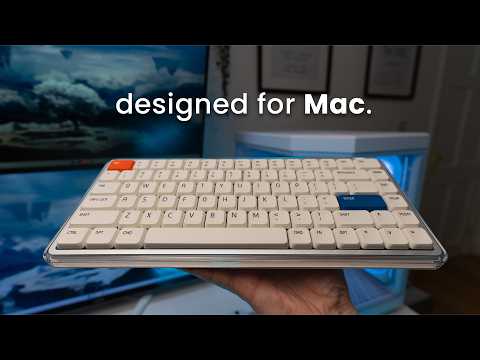
빠르게 변화하는 디지털 세계에서 MelGeek은 기술이 효율적이면서 차분함의 원천이 되어야 한다고 믿습니다. 현대 Apple 사용자를 위해 디자인된 O2(Mac용) 키보드는 미니멀리스트 설정과 완벽하게 조화를 이루면서 독특한 스타일을 표현하여 모든 상호 작용에 신선한 공기를 불어넣습니다.

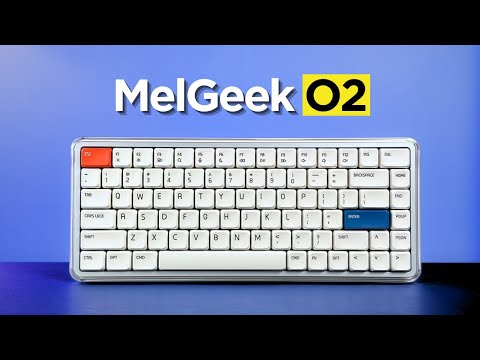
순수하고 가벼우며 필수적입니다. O2(Mac용)는 맑고 투명한 고투명 프레임과 세련된 화이트 베이스로 새틴과 유광 마감을 예술적으로 결합하여 공기의 본질을 포착합니다.
이는 MacBook의 깔끔한 미학과 완벽하게 조화되는 시각적으로 레이어드된 산뜻한 존재감을 만들어내 책상과 작업 흐름을 밝게 해줍니다.

MelGeek O2(Mac용)는 Mac 사용자를 위해 특별히 제작되어 세련된 디자인부터 직관적인 시스템 통합에 이르기까지 MacBook 키보드의 모든 세부 사항을 반영하는 완벽한 경험을 제공합니다.
키 레이아웃과 기능 영역부터 FN 단축키, 키캡의 미묘한 둥근 모서리까지 모든 측면이 세심하게 일치하여 눈과 손끝에 자연스럽고 자연스러운 전환을 보장합니다.

더 넓은 표면, 부드러운 촉감, 지속적인 내구성을 갖춘 로우 프로파일 스위치용으로 설계된 MIA의 PBT 키캡으로 더 많은 편안함과 제어력을 경험해 보세요.

1,600만 가지 색상의 RGB 효과를 모두 갖춘 듀얼 주변 측면 조명과 생동감 넘치는 백라이트로 이상적인 작업 공간 분위기를 조성하세요. Hive 2.0을 통해 호흡 또는 정적 조명 모드를 손쉽게 사용자 정의하고 몰입감 있고 분위기를 조성하는 조명으로 책상을 즉시 높여보세요.

지능형 83개 키 레이아웃은 작은 공간 내에서 모든 필수 기능을 유지하여 귀중한 책상 공간을 확보합니다.

슬림한 프로필과 부드럽게 둥근 모서리는 인체공학적 편안함을 위해 제작되어 장시간 사용 중에도 자연스럽고 피로 없는 타이핑 경험을 보장합니다.


MelGeek O2(Mac용)는 뛰어난 감각 경험을 위해 설계되었습니다. 개스킷 마운트와 전용 스위치를 갖춘 고급 음향 및 서스펜션 시스템은 매일 좋아할 만한 느낌과 사운드를 제공하는 편안함을 제공합니다.


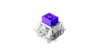
KAILH가 공동 개발한 주황색 줄기가 있는 투명한 Sunshine 스위치는 가볍고 부드러운 선형 느낌과 부드럽고 쿠션감 있는 사운드를 제공하여 업무와 공부에 이상적입니다. 95% 이상의 S크기 기계식 키보드와 호환됩니다(자기 스위치 제외).
O2(Mac용) 타자 소리

고성능 Nordic 칩셋과 초고속 1000Hz 폴링 속도를 갖춘 O2(Mac용)는 초고속, 지연 없는 입력을 보장하여 고급 사용자에게 진정한 기본 타이핑 경험을 제공합니다.
즉시 사용 가능한 O2(Mac용)는 손쉬운 타이핑, 친숙한 단축키 및 미디어 컨트롤을 제공하므로 학습 곡선이 필요하지 않습니다. Mac OS, Windows 등에서 원활한 작업 흐름을 위해 MacBook에서 iPad, iPhone까지 최대 8개의 장치 간에 즉시 전환할 수 있습니다.
미학과 생산성 모두를 중시하는 사람들을 위해 O2(Mac용)는 Mac 경험을 데스크톱과 그 이상으로 완벽하게 구현하는 진정한 기본 키보드입니다.


대용량 2500mAh 배터리로 구동되는 O2(Mac용)는 지속적인 재충전 없이 작업 리듬을 따라갈 수 있도록 제작되었습니다.


Overall rating: 4.8 / 5 from 112 reviews.

La experiencia con este teclado ha sido excelente. Su perfil bajo permite escribir con gran comodidad, mientras que el sonido de las teclas resulta muy agradable. Además, cuenta con un diseño atractivo y ofrece distintas opciones de configuración. Tengo varios teclados mecánicos, incluidos algunos de Apple, pero considero que este es el que ofrece la mejor experiencia en cuanto a diseño, comodidad y sonido.

Exceptional build quality, incredible sound and feel. The best low profile keyboard so far.

I couldn’t be happier with the MelGeek O2 . From the moment I started using it, it was clear that this is a thoughtfully designed, premium product. The build quality is outstanding… solid, well-balanced, and with a finish that feels both durable and refined. Typing on it is an absolute pleasure. The key feel is smooth, responsive, and satisfying without being overly loud, making it perfect for both focused work and everyday use. What really stands out is the attention to detail. Everything from the layout to the overall ergonomics feels intentional and well-executed. It’s comfortable to use for long periods, and it genuinely enhances the typing experience rather than just getting the job done. I also appreciate how seamlessly it fits into a clean, modern workspace. It’s not just a functional tool… it’s something you actually enjoy having on your desk. Overall, I’m extremely pleased with this keyboard. It strikes an excellent balance between performance, aesthetics, and comfort. Highly recommended for anyone looking to upgrade their setup.

Nice typing keyboard, very smooth and with a nice sound. The keys require a tad bit more force to press to my liking, but it is still great to type on.

No complaints 10/10

This keyboard is a work of art, love how quiet and comfy the switches are! Totally recommended!

I’ve been using the MelGeek O2 low-profile mechanical keyboard, and it’s genuinely one of the most comfortable keyboards I’ve typed on. The low-profile design makes a big difference my wrists feel more relaxed, especially during long coding sessions, and there’s noticeably less strain compared to standard mechanical keyboards. The typing experience is smooth and satisfying, with that creamy keystroke sound that’s quiet but still tactile enough to enjoy. It feels premium without being distracting, which really helps when you’re trying to stay focused. The keyboard is also sleek, compact, and well-built, making it perfect for both work setups and everyday use. Overall, the MelGeek O2 strikes a great balance between ergonomics, performance, and aesthetics. If you spend most of your day on a keyboard and care about comfort as much as functionality, this is definitely a solid choice.

Melgeekが得意なポリカボディは質感もあり高級感があります。ポップなデザインでありながら質感が高く満足しています。音質はロープロファイルにありがちなペチペチした音ではなく、ChocV2としては非常に抑制の効いた音です。経験に基づいたよく作り込まれた製品です。

Absolutely excellent keyboard! Throughout the days or week, I will swap keyboards out back and forth since they all have a different feel and sound to them, but I have to say that I get genuinely excited when I reach for the O2. Build quality is top quality, the aesthetics of the board are just beautiful, and the feel is incredible. The gasket mount offers a nice cushioned experience when typing, the switches are buttery smooth and provide a nice tackity-tack when typing. It’s a nice, bright thock that’s pleasant to the ears. RGB is bright and pretty, with the side accents being a nice touch! Magnetic feet are super convenient and the keyboard works well sitting on top of my MacBook Air M4. Connectivity has been solid through Bluetooth, 2.4ghz and wired modes. I like the idea of being able to hot swap this keyboard, but with how nice it is already, I don’t think I would change a thing about this board. The only downside I have to this board is that it cannot be taken apart. I personally have no need to do that, but for the sake of others who wants to add or remove foam, maybe tape mod the board, it’s not possible. Other than that, the board is perfect for me and will continue to be in my lineup going forward. Great job, MelGeek!

ok

Great keyboard. I prefer this typing feel over my magic keyboard. Great tonal sound when typing. Using it to switch between both Mac studio and work laptop now. Please refer to my other review with photo. Very happy with the purchase and build quality. Using it via Bluetooth connectivity and it is very responsive.

I love its design!

My first mechanical keyboard. Low profile which I prefer. Bought this to use with my windows pc but also with mac studio as well. You can switch between profiles very easily. It feels great to type with and has a very comfortable angle to make typing easy. Almost prefer this over my apple magic keyboard for typing feel. I still use the magic however as it has touch id and I am using it with a studio. Would highly recommend the o2 keyboard for macbook users.

best keyboard i've ever used!

Beautiful, elegant, love it!

This is an almost perfect keyboard. Tactiles are great, with a key advance that is close to perfect for a low-profile keyboard. Sound is amazing, buttery, discreet, but still pleasant to hear, and the features are generally great. Navigating the keyboard is easy and intuitive, with no connection problems on a MacBook Pro 14". The only downside is that double or triple input on my W key. It can be pretty annoying, and I am not sure if it will be a production issue that other keyboards will have as well. So far, it has not been a dealbreaker; however, I am not sure if it will become one in the future. Makes it fall from the excellent mark.

The keyboard is nice, feels good to type with and carry around. The keyboard could be better as it has a very low battery life. I feel as though it is running out after an hour or so of using it and starts to stop registering my button presses. It also would be nice to come with a case or bag to hold the keyboard while carrying it around. If there was a space for the usb to be stored within the keyboard it would also add to the fact it’s able to be lightweight and movable. I tend to use it with my MacBook and move from different locations. Otherwise solid keyboard and happy with price.

Honestly awesome. I have the Mojo and hesitated taking it to office but this one works.

Amazing keyboard! Great sound, packaging, and overall experience. And just look how incredible it looks with Work Louder keycaps. I really love it!

Very good keyboard. Smooooothy switches. Love it!

Love it!!

I love the feel of keys and switches out of box. Only issue is brightness keys on F1 and F2 and Fn key does not bring up emoji window. I am sure this can be fixed with firmware. Still I give 5 out of 5 for looks and feel. Lighting is great. I am always pleased with melgeek keyboards. This is coming from someone who has 3 or 4 keyboards from each of the competitors. Melgeek and lofree are my daily drivers.

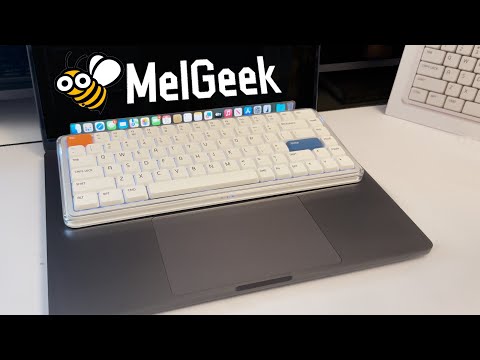
This keyboard works great with a Mac. It’s just slightly bigger than the built-in MacBook keyboard, you can place it right on top without pressing any keys by mistake. Super convenient and comfortable!
Love the feel of the keys, the creamy sound when typing, and the look of it. Set up was easy. My favorite keyboard so far.
.
Very nice.
Love it!
My best low profile keyboard. I love it!
Beautiful to look at, even more beautiful sounds coming out of it! I own a few low profile keyboards and this has got to be my best one yet out of the box. No flaws so far, from the aesthetics to the typing sound and feel, to the construction quality, to the functionality. No firmware quirks, wakes up from sleep instantly and registers the first key without fault, the space bar is so nicely tuned (better than all my keyboards, including premium ones). I kind find any faults for my use case and preferences.
I wasn't planning on writing a review, but MelGeek insisted I write one, they keep sending me emails. The delivery time was longer than stated, it took such a long time to be delivered. The keyboard itself is okay but trying to administrate the software is hard af, I can't get it to work reliable to work wirelessly. Not only that but the battery percentage appears to be reported incorrectly, the keyboard died but it reported it was at 63% consistently.
The feel, responsiveness and the sound this board makes is just heaven.
great keyboard, killer feature - fast connection after idle period. I had a number of keyboards, and this one is the fastest in terms of awaking time. What is not good, is battery life with active backlight - when it's on, keyboard lives around couple of days only.
Love it!
it's great. wish it had a num pad though
The kind of keyboard I was looking for, soft, cozy sound and very comfortable. The typing experience is actually incredible.
It types nicely. I'm still getting used to mechanical keyboards in general since I switched from a apple magic keyboard
I love the my O2 keyboard. I use it at home and carry it to work. My coworker said it looks cool.
Great keyboard! The typing experience is smooth
Feels great to type on, sounds amazing and works great for me.
I LOVE this keyboard. The aesthetic and versatility are unmatched. Perfect for what I was wanting!
자주 묻는 질문
Mac용 O2는 Mac 사용자를 위해 설계되었나요?
예, Mac용 O2는 보다 친숙한 외부 키보드 경험을 원하는 Mac 사용자를 위해 설계되었습니다. Mac 친화적인 키 레이아웃, 기능 영역, FN 단축키 및 로우 프로파일 타이핑 느낌은 사용자가 MacBook 키보드에서 데스크탑 설정으로 전환하는 데 도움이 됩니다.
Mac용 MelGeek O2와 O2의 차이점은 무엇입니까?
MelGeek O2와 Mac용 O2는 동일한 코어 타이핑, 무선 및 로우 프로파일 키보드 경험을 공유합니다. 가장 큰 차이점은 레이아웃 경험입니다. 왜냐하면 Mac용 O2는 Mac 스타일의 키 위치와 단축키 습관을 선호하는 사용자를 위해 조정되었기 때문입니다.
Mac용 O2가 Windows에서 작동할 수 있나요?
예, Mac용 O2는 Windows에서 작동할 수 있습니다. 레이아웃 위치 지정은 Mac 우선이지만 Windows 사용자는 필요할 때 키보드를 사용하고 포함된 교체 키캡으로 설정을 조정할 수 있습니다.
MelGeek O2는 긴 타이핑 세션에 편안합니까?
예, MelGeek O2는 긴 타이핑 세션을 위해 설계되었습니다. 로우 프로파일 키 높이는 손가락 이동을 줄이는 데 도움이 되며, MIA PBT 키캡, 개스킷 마운트 및 조정 가능한 타이핑 각도는 보다 자연스러운 일상 타이핑 경험을 지원합니다.
Mac용 O2를 사용하려면 MelGeek Hive가 필요합니까?
아니요, Mac용 O2는 소프트웨어 설정 없이 일반 타이핑에 사용할 수 있습니다. MelGeek Hive는 키를 다시 매핑하고, 조명을 조정하고, 매크로를 구성하고, 펌웨어를 업데이트할 때 주로 유용합니다.
MelGeek O2에는 숫자 패드가 있나요?
아니요, MelGeek O2는 83키 컴팩트 레이아웃을 사용하며 숫자 패드가 포함되어 있지 않습니다. 이 레이아웃은 책상 공간을 절약하지만 하루 종일 숫자를 입력하는 사용자는 더 큰 키보드를 선호할 수 있습니다.
| 정보 |
| 색상 |
| 키 수 |
| 케이스 재질 |
| 키캡 재질 |
| 폴링 속도 |
| 스위치 |
| 백라이팅 |
| RT 정밀도 |
| 불감대 |
| 지연 |
| 가격 |
|
정보
N/A
|
|
색상
N/A
|
|
키 수
N/A
|
|
케이스 재질
N/A
|
|
키캡 재질
N/A
|
|
폴링 속도
N/A
|
|
스위치
N/A
|
|
백라이팅
N/A
|
|
RT 정밀도
N/A
|
|
불감대
N/A
|
|
지연
N/A
|
|
가격
N/A
|


