






“Insgesamt bietet die MelGeek O2 ein angenehmes Tipperlebnis, das die Geschwindigkeit und Geschmeidigkeit einer mechanischen Tastatur mit dem Komfort und der Kompatibilität verbindet, die Mac-Benutzer erwarten.”
@Nicholas Calderone




Entdecken Sie unseren Einkaufsführer, um Ihre perfekte MelGeek-Tastatur zu finden.

Schauen Sie sich unseren FAQ-Bereich an oder wenden Sie sich direkt an uns – wir helfen Ihnen gerne weiter.
Farbe:
Möglichkeit:
Quantity


Entdecken Sie unseren Einkaufsführer, um Ihre perfekte MelGeek-Tastatur zu finden.
Schauen Sie sich unseren FAQ-Bereich an oder wenden Sie sich direkt an uns – wir helfen Ihnen gerne weiter.
“Insgesamt bietet die MelGeek O2 ein angenehmes Tipperlebnis, das die Geschwindigkeit und Geschmeidigkeit einer mechanischen Tastatur mit dem Komfort und der Kompatibilität verbindet, die Mac-Benutzer erwarten.”
@Nicholas Calderone

“Ich habe viele Tastaturen getestet, um die beste für den täglichen Gebrauch an meinem Arbeitsplatz zu finden, und obwohl viele nah dran sind, ist die O2 von MelGeek die beste Wahl.”
@Brian Patterson

“Wenn Sie von Ihrem Magic Keyboard wechseln möchten, könnte das O2 für Mac eine der besten Optionen sein. Das Angebot von MelGeek ist preislich wettbewerbsfähig und könnte für den richtigen Nutzer die bessere Wahl sein.”
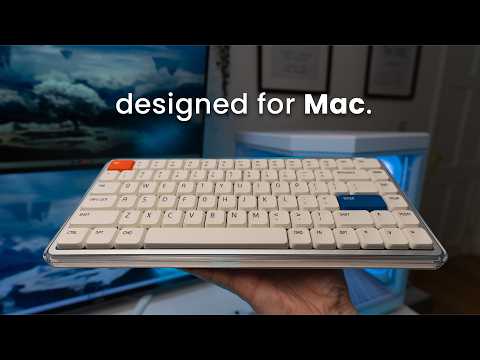
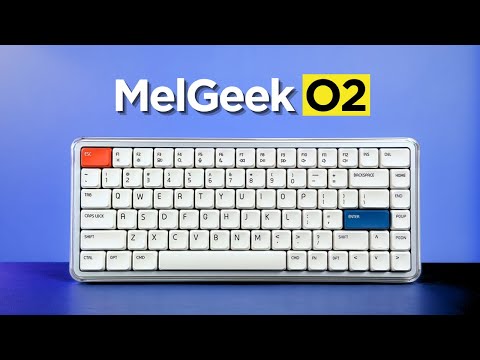
In der schnelllebigen digitalen Welt ist MelGeek überzeugt, dass Technologie sowohl effizient als auch beruhigend sein sollte. Die O2-Tastatur (für Mac) wurde für den modernen Apple-Nutzer entwickelt und fügt sich nahtlos in Ihr minimalistisches Setup ein, während sie gleichzeitig einen einzigartigen Stil unterstreicht und jede Interaktion zu einem erfrischenden Erlebnis macht.

Rein, leicht und essentiell. Die O2 (für Mac) fängt die Essenz der Luft ein mit einem kristallklaren, hochtransparenten Rahmen und einem eleganten weißen Sockel, der Satin- und Glanzoberflächen kunstvoll vereint.
Dadurch entsteht eine visuell vielschichtige, erfrischende Präsenz, die perfekt zur klaren Ästhetik Ihres MacBooks passt und Ihren Schreibtisch und Ihren Arbeitsablauf aufhellt.

Das MelGeek O2 (für Mac) wurde speziell für Mac-Benutzer entwickelt und bietet ein nahtloses Erlebnis, das jedes Detail der MacBook-Tastatur widerspiegelt – vom eleganten Design bis zur intuitiven Systemintegration.
Jeder Aspekt, von der Tastenanordnung und den Funktionszonen bis hin zu den FN-Tastenkombinationen und den dezent abgerundeten Ecken der Tastenkappen, ist sorgfältig aufeinander abgestimmt, um einen natürlichen, intuitiven Übergang für Ihre Augen und Fingerspitzen zu gewährleisten.

Erleben Sie mehr Komfort und Kontrolle mit den PBT-Tastenkappen von MIA – entwickelt für flache Schalter, mit größerer Oberfläche, seidigem Anschlag und dauerhafter Haltbarkeit.

Schaffen Sie mit zwei stimmungsvollen Seitenlichtern und einer lebendigen Hintergrundbeleuchtung, die alle über RGB-Effekte mit 16 Millionen Farben verfügen, die ideale Arbeitsplatzatmosphäre. Passen Sie die Beleuchtungsmodi – ob pulsierend oder statisch – mühelos über Hive 2.0 an und werten Sie Ihren Schreibtisch im Handumdrehen mit stimmungsvoller Beleuchtung auf.

Das intelligente Layout mit 83 Tasten bietet alle wesentlichen Funktionen auf kleinstem Raum und spart so wertvollen Platz auf dem Schreibtisch.

Das schlanke Profil und die sanft abgerundeten Kanten sorgen für ergonomischen Komfort und gewährleisten ein natürliches und ermüdungsfreies Tippgefühl, auch bei längeren Sitzungen.


Der MelGeek O2 (für Mac) wurde für ein überragendes Hörerlebnis entwickelt. Dank Dichtungsmontage und exklusivem Schalter bietet sein fortschrittliches Akustik- und Aufhängungssystem spürbaren Komfort und einen Klang, den Sie jeden Tag lieben werden.


Der von KAILH mitentwickelte, transparente Sunshine Switch mit orangefarbenem Schaft bietet ein leichtes, sanftes und gedämpftes Tippgefühl sowie einen weichen, angenehmen Klang – ideal zum Arbeiten und Lernen. Kompatibel mit über 95 % aller gängigen Tastaturen. S-große mechanische Tastaturen (ausgenommen magnetische Schalter).
O2 (für Mac) Tippgeräusche

Ausgestattet mit einem leistungsstarken Nordic-Chipsatz und einer ultraschnellen Abtastrate von 1000 Hz, gewährleistet O2 (für Mac) blitzschnelle, verzögerungsfreie Eingaben und bietet so ein wirklich natives Tipperlebnis für anspruchsvolle Benutzer.
Die O2 (für Mac) ist sofort einsatzbereit und bietet müheloses Tippen, vertraute Tastenkombinationen und Mediensteuerung – ganz ohne Einarbeitungszeit. Wechseln Sie nahtlos zwischen bis zu acht Geräten, von Ihrem MacBook über Ihr iPad bis hin zu Ihrem iPhone, für einen reibungslosen Workflow unter macOS, Windows und weiteren Betriebssystemen.
Für alle, die Wert auf Ästhetik und Produktivität legen, ist O2 (für Mac) die wirklich native Tastatur, die das Mac-Erlebnis perfekt auf Ihren Desktop und darüber hinaus bringt.


Ausgestattet mit einem leistungsstarken 2500-mAh-Akku, ist das O2 (für Mac) darauf ausgelegt, mit Ihrem Arbeitsrhythmus Schritt zu halten, ohne dass Sie es ständig aufladen müssen.


Overall rating: 4.8 / 5 from 109 reviews.

La experiencia con este teclado ha sido excelente. Su perfil bajo permite escribir con gran comodidad, mientras que el sonido de las teclas resulta muy agradable. Además, cuenta con un diseño atractivo y ofrece distintas opciones de configuración. Tengo varios teclados mecánicos, incluidos algunos de Apple, pero considero que este es el que ofrece la mejor experiencia en cuanto a diseño, comodidad y sonido.

Exceptional build quality, incredible sound and feel. The best low profile keyboard so far.

I couldn’t be happier with the MelGeek O2 . From the moment I started using it, it was clear that this is a thoughtfully designed, premium product. The build quality is outstanding… solid, well-balanced, and with a finish that feels both durable and refined. Typing on it is an absolute pleasure. The key feel is smooth, responsive, and satisfying without being overly loud, making it perfect for both focused work and everyday use. What really stands out is the attention to detail. Everything from the layout to the overall ergonomics feels intentional and well-executed. It’s comfortable to use for long periods, and it genuinely enhances the typing experience rather than just getting the job done. I also appreciate how seamlessly it fits into a clean, modern workspace. It’s not just a functional tool… it’s something you actually enjoy having on your desk. Overall, I’m extremely pleased with this keyboard. It strikes an excellent balance between performance, aesthetics, and comfort. Highly recommended for anyone looking to upgrade their setup.

Nice typing keyboard, very smooth and with a nice sound. The keys require a tad bit more force to press to my liking, but it is still great to type on.

No complaints 10/10

This keyboard is a work of art, love how quiet and comfy the switches are! Totally recommended!

I’ve been using the MelGeek O2 low-profile mechanical keyboard, and it’s genuinely one of the most comfortable keyboards I’ve typed on. The low-profile design makes a big difference my wrists feel more relaxed, especially during long coding sessions, and there’s noticeably less strain compared to standard mechanical keyboards. The typing experience is smooth and satisfying, with that creamy keystroke sound that’s quiet but still tactile enough to enjoy. It feels premium without being distracting, which really helps when you’re trying to stay focused. The keyboard is also sleek, compact, and well-built, making it perfect for both work setups and everyday use. Overall, the MelGeek O2 strikes a great balance between ergonomics, performance, and aesthetics. If you spend most of your day on a keyboard and care about comfort as much as functionality, this is definitely a solid choice.

Melgeekが得意なポリカボディは質感もあり高級感があります。ポップなデザインでありながら質感が高く満足しています。音質はロープロファイルにありがちなペチペチした音ではなく、ChocV2としては非常に抑制の効いた音です。経験に基づいたよく作り込まれた製品です。

Absolutely excellent keyboard! Throughout the days or week, I will swap keyboards out back and forth since they all have a different feel and sound to them, but I have to say that I get genuinely excited when I reach for the O2. Build quality is top quality, the aesthetics of the board are just beautiful, and the feel is incredible. The gasket mount offers a nice cushioned experience when typing, the switches are buttery smooth and provide a nice tackity-tack when typing. It’s a nice, bright thock that’s pleasant to the ears. RGB is bright and pretty, with the side accents being a nice touch! Magnetic feet are super convenient and the keyboard works well sitting on top of my MacBook Air M4. Connectivity has been solid through Bluetooth, 2.4ghz and wired modes. I like the idea of being able to hot swap this keyboard, but with how nice it is already, I don’t think I would change a thing about this board. The only downside I have to this board is that it cannot be taken apart. I personally have no need to do that, but for the sake of others who wants to add or remove foam, maybe tape mod the board, it’s not possible. Other than that, the board is perfect for me and will continue to be in my lineup going forward. Great job, MelGeek!

ok

Great keyboard. I prefer this typing feel over my magic keyboard. Great tonal sound when typing. Using it to switch between both Mac studio and work laptop now. Please refer to my other review with photo. Very happy with the purchase and build quality. Using it via Bluetooth connectivity and it is very responsive.

I love its design!

My first mechanical keyboard. Low profile which I prefer. Bought this to use with my windows pc but also with mac studio as well. You can switch between profiles very easily. It feels great to type with and has a very comfortable angle to make typing easy. Almost prefer this over my apple magic keyboard for typing feel. I still use the magic however as it has touch id and I am using it with a studio. Would highly recommend the o2 keyboard for macbook users.

best keyboard i've ever used!

Beautiful, elegant, love it!

This is an almost perfect keyboard. Tactiles are great, with a key advance that is close to perfect for a low-profile keyboard. Sound is amazing, buttery, discreet, but still pleasant to hear, and the features are generally great. Navigating the keyboard is easy and intuitive, with no connection problems on a MacBook Pro 14". The only downside is that double or triple input on my W key. It can be pretty annoying, and I am not sure if it will be a production issue that other keyboards will have as well. So far, it has not been a dealbreaker; however, I am not sure if it will become one in the future. Makes it fall from the excellent mark.

The keyboard is nice, feels good to type with and carry around. The keyboard could be better as it has a very low battery life. I feel as though it is running out after an hour or so of using it and starts to stop registering my button presses. It also would be nice to come with a case or bag to hold the keyboard while carrying it around. If there was a space for the usb to be stored within the keyboard it would also add to the fact it’s able to be lightweight and movable. I tend to use it with my MacBook and move from different locations. Otherwise solid keyboard and happy with price.

Honestly awesome. I have the Mojo and hesitated taking it to office but this one works.

Amazing keyboard! Great sound, packaging, and overall experience. And just look how incredible it looks with Work Louder keycaps. I really love it!

Very good keyboard. Smooooothy switches. Love it!

Love it!!

I love the feel of keys and switches out of box. Only issue is brightness keys on F1 and F2 and Fn key does not bring up emoji window. I am sure this can be fixed with firmware. Still I give 5 out of 5 for looks and feel. Lighting is great. I am always pleased with melgeek keyboards. This is coming from someone who has 3 or 4 keyboards from each of the competitors. Melgeek and lofree are my daily drivers.

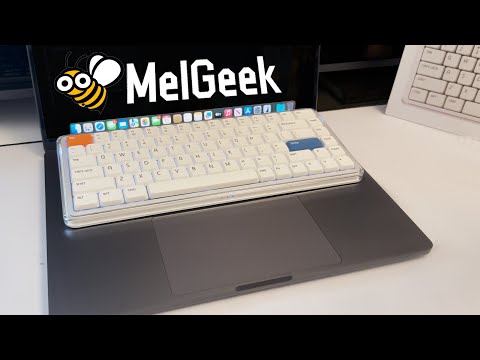
This keyboard works great with a Mac. It’s just slightly bigger than the built-in MacBook keyboard, you can place it right on top without pressing any keys by mistake. Super convenient and comfortable!
Love it!
My best low profile keyboard. I love it!
Beautiful to look at, even more beautiful sounds coming out of it! I own a few low profile keyboards and this has got to be my best one yet out of the box. No flaws so far, from the aesthetics to the typing sound and feel, to the construction quality, to the functionality. No firmware quirks, wakes up from sleep instantly and registers the first key without fault, the space bar is so nicely tuned (better than all my keyboards, including premium ones). I kind find any faults for my use case and preferences.
I wasn't planning on writing a review, but MelGeek insisted I write one, they keep sending me emails. The delivery time was longer than stated, it took such a long time to be delivered. The keyboard itself is okay but trying to administrate the software is hard af, I can't get it to work reliable to work wirelessly. Not only that but the battery percentage appears to be reported incorrectly, the keyboard died but it reported it was at 63% consistently.
The feel, responsiveness and the sound this board makes is just heaven.
great keyboard, killer feature - fast connection after idle period. I had a number of keyboards, and this one is the fastest in terms of awaking time. What is not good, is battery life with active backlight - when it's on, keyboard lives around couple of days only.
Love it!
it's great. wish it had a num pad though
The kind of keyboard I was looking for, soft, cozy sound and very comfortable. The typing experience is actually incredible.
It types nicely. I'm still getting used to mechanical keyboards in general since I switched from a apple magic keyboard
I love the my O2 keyboard. I use it at home and carry it to work. My coworker said it looks cool.
Great keyboard! The typing experience is smooth
Feels great to type on, sounds amazing and works great for me.
I LOVE this keyboard. The aesthetic and versatility are unmatched. Perfect for what I was wanting!
Very nice keyboard only bad thing is that you can't take it apart. 2 switches are slightly scratchy but I could swap them to end or something.
its good
Great keyboard, good height and durable feel.
HÄUFIG GESTELLTE FRAGEN
Ist O2 für Mac für Mac-Nutzer konzipiert?
Ja, O2 für Mac wurde für Mac-Nutzer entwickelt, die ein vertrautes externes Tastaturerlebnis bevorzugen. Das Mac-freundliche Tastenlayout, die Funktionszonen, die FN-Tastenkombinationen und das flache Tippgefühl erleichtern den Umstieg von einer MacBook-Tastatur auf ein Desktop-Setup.
Worin besteht der Unterschied zwischen MelGeek O2 und O2 für Mac?
Die MelGeek O2 und die O2 für Mac bieten das gleiche grundlegende Tippgefühl, kabellose Verbindung und ein flaches Design. Der Hauptunterschied liegt im Layout, da die O2 für Mac speziell für Nutzer entwickelt wurde, die die Tastenanordnung und die gewohnten Tastenkombinationen eines Mac bevorzugen.
Ist O2 für Mac mit Windows kompatibel?
Ja, die O2-Tastatur für Mac ist auch mit Windows kompatibel. Das Layout ist zwar primär auf Mac ausgelegt, aber Windows-Nutzer können die Tastatur trotzdem verwenden und die Einstellungen bei Bedarf mit den mitgelieferten Ersatztastenkappen anpassen.
Ist der MelGeek O2 auch für längere Schreibarbeiten geeignet?
Ja, die MelGeek O2 ist für lange Schreibsessions konzipiert. Die niedrige Tastenhöhe reduziert den Fingerweg, während die MIA-PBT-Tastenkappen, die Dichtungsmontage und der einstellbare Tippwinkel ein natürlicheres Tippgefühl im Alltag ermöglichen.
Benötige ich MelGeek Hive, um O2 für Mac zu nutzen?
Nein, O2 für Mac kann ohne Softwareinstallation zum normalen Tippen verwendet werden. MelGeek Hive ist hauptsächlich dann nützlich, wenn Sie Tasten neu belegen, die Beleuchtung anpassen, Makros konfigurieren oder die Firmware aktualisieren möchten.
Verfügt MelGeek O2 über einen Nummernblock?
Nein, die MelGeek O2 verfügt über ein kompaktes 83-Tasten-Layout und keinen Nummernblock. Dieses Layout spart Platz auf dem Schreibtisch, aber Benutzer, die den ganzen Tag Zahlen eingeben, bevorzugen möglicherweise eine größere Tastatur.
|
Comparison |
| Farbe |
| Anzahl der Tasten |
| Gehäusematerial |
| Tastenkappenmaterial |
| Abfragerate |
| Schalter |
| Hintergrundbeleuchtung |
| RT-Präzision |
| Totzone |
| Latenz |
| Preis |
|
|
|
Farbe
N/A
|
|
Anzahl der Tasten
N/A
|
|
Gehäusematerial
N/A
|
|
Tastenkappenmaterial
N/A
|
|
Abfragerate
N/A
|
|
Schalter
N/A
|
|
Hintergrundbeleuchtung
N/A
|
|
RT-Präzision
N/A
|
|
Totzone
N/A
|
|
Latenz
N/A
|
|
Preis
N/A
|

