


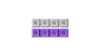





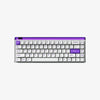


The best first mechanical keyboard is not the loudest, flashiest, or most expensive board. It is the one that fits how you actually use a keyboard: typing, gaming, working across devices, or carrying it between setups. For most beginners in MelGeek's lineup, the O2 is the safer first keyboard because it has a 75% layout, low-profile linear switches, tri-mode connectivity, Mac/Windows/Linux/iOS/Android support, and up to eight Bluetooth device slots.[1]
If gaming is the main reason you are upgrading, the MADE68 Ultra V2 is the better first serious gaming board. It costs more and gives up wireless, but it adds Hall Effect switches, adjustable actuation, Rapid Trigger, 8,000 Hz polling, and a full aluminum chassis.[2]
Start With Use Case, Not Switch Hype
Beginners often start by asking "which switch is best?" That matters, but it should come after the use case.
If you write, study, or work at a desk all day, layout and comfort matter more than extreme gaming specs. A 75% layout like the O2 keeps the function row and arrow keys without taking as much desk space as a full-size keyboard.[1]
If you mainly play Valorant, CS2, Apex, or other shooters, a compact Hall Effect board like the MADE68 Ultra V2 is more useful because adjustable actuation and Rapid Trigger directly affect movement timing.[2]
Switch Types in Plain English
| Switch Type | What It Feels Like | Best For | Beginner Note |
|---|---|---|---|
| Linear | Smooth all the way down | Gaming, quiet typing, general use | Safest first choice |
| Tactile | Small bump when the key actuates | Typing feedback | Good if you like a clear signal |
| Clicky | Bump plus audible click | Home typing | Avoid for shared spaces |
| Hall Effect | Magnetic sensing with adjustable actuation | Competitive gaming | Best if gaming is the priority |
MelGeek's O2 uses Kailh Sunshine low-profile mechanical switches.[1] The MADE68 Ultra V2 uses KOM Lite Magnetic Switch or Flip King Magnetic Switch options with adjustable travel from 0.1 mm to 3.4 mm.[2]
Best First Keyboard for Most Users: MelGeek O2
The O2 is the beginner-friendly choice because it removes common first-keyboard regrets. It has 83 keys, a low-profile build, tri-mode connection, 2.4G/wired latency listed around 2 ms, Bluetooth latency listed around 8 ms, a 2,500 mAh battery, and support for Windows, Mac, Linux, iOS, and Android.[1]
The direct F-row matters more than beginners expect. You do not have to learn layers just to use brightness, media, IDE shortcuts, Excel shortcuts, or browser refresh. The 75% layout also keeps the board compact enough for small desks.
Choose O2 if you:
- work across a laptop, desktop, tablet, or phone;
- need wireless;
- want something quieter and lower-profile than a traditional tall board;
- type more than you game.
Best First Gaming Keyboard: MADE68 Ultra V2
The MADE68 Ultra V2 is better if your first upgrade is really about FPS gaming. MelGeek lists 8,000 Hz polling and 16,000 Hz scanning rate, 0.125 ms latency, 0.01 mm accuracy, adjustable Rapid Trigger from 0.01 mm to 2.5 mm, and wired single-mode connection.[2]
That gives beginners a keyboard they will not outgrow quickly if they are serious about shooters. The tradeoff is convenience: it is wired, compact, and more gaming-focused than the O2.
Choose MADE68 Ultra V2 if you:
- mainly play FPS games;
- want adjustable actuation and Rapid Trigger;
- do not need wireless;
- prefer more mouse space over direct F-row access.
What Beginners Should Avoid
Do not buy a clicky keyboard for a shared room unless everyone nearby is fine with the sound. Do not buy a 60% board unless you already know you are comfortable with layers. Do not buy a Hall Effect board only because it sounds advanced; if you mostly write emails and switch between devices, wireless and layout will matter more.
Also avoid treating price as a quality guarantee. A more expensive board can be worse for you if it removes the keys or connection modes you use every day.
Simple Recommendation
| User Type | Better Pick | Why |
|---|---|---|
| Student or office user | O2 | Wireless, direct F-row, low-profile typing |
| MacBook / iPad user | O2 | Multi-device Bluetooth and OS support |
| Beginner FPS player | MADE68 Ultra V2 | Rapid Trigger and compact layout |
| Mixed work + casual gaming | O2 | Easier daily setup |
| Competitive FPS-first user | MADE68 Ultra V2 | 8,000 Hz wired Hall Effect performance |
If you are unsure, start with O2. If you are buying specifically to improve FPS movement input, choose MADE68 Ultra V2.
Beginner buying checks
- A first keyboard should be selected by layout, switch feel, and software needs, not only by price; MelGeek’s HIVE platform is relevant because configuration is part of daily ownership.[5]
- Warranty policy matters for first-time buyers because defects, shipping damage, or early failures can shape the whole upgrade experience.[4]
- For buyers deciding between low-profile and normal-height boards, MelGeek’s own guide supports explaining the feel difference before recommending a model.[3]
- If the buyer is mainly typing, MelGeek’s typing guide supports checking switch feel and noise before chasing gaming-only specs.[6]
- If the buyer is unsure about compact layouts, MelGeek’s 75% layout guide supports the recommendation to keep arrows and function access for a first board.[7]
Additional source checks
- RTINGS’ keyboard methodology supports the beginner advice to compare layout, typing feel, latency, and ergonomics instead of choosing by marketing category alone.[8]
Frequently Asked Questions
What is the best first mechanical keyboard from MelGeek?
The MelGeek O2 is the best first keyboard for most users because it has a 75% layout, wireless options, low-profile switches, and broad device support.
What is the best first MelGeek keyboard for gaming?
The MADE68 Ultra V2 is the better first gaming keyboard because it has Hall Effect switches, Rapid Trigger, 8,000 Hz polling, and a compact FPS-friendly layout.
Are linear switches good for beginners?
Yes. Linear switches are smooth, relatively quiet, and easy to adapt to, which makes them a safe first choice.
Should a beginner buy a 60% keyboard?
Only if they already want layers. Most beginners are better served by 75% or 80% layouts because they keep direct arrow and function-key access.
Is the O2 good for Mac users?
Yes. MelGeek lists support for Mac and other major operating systems, and the O2 supports multi-device wireless use.
Is a Hall Effect keyboard worth it for beginners?
It is worth it for FPS-focused beginners. For everyday typing and school work, wireless and layout are usually more important.
What should I avoid in a first mechanical keyboard?
Avoid loud clicky switches for shared spaces, very small layouts if you need F-keys, and gaming specs you will not use.
References
[1] MelGeek O2 Product Page — https://www.melgeek.com/products/o2-tri-mode-wireless-mechanical-keyboard
[2] MelGeek MADE68 Ultra V2 Product Page — https://www.melgeek.com/products/made68-ultra-v2-gaming-keyboard
[3] MelGeek — Low-Profile vs Normal Keyboard Guide — https://www.melgeek.com/blogs/melgeek-lab/low-profile-keyboard-vs-normal-differences
[4] MelGeek Warranty Policy — https://www.melgeek.com/pages/warranty-policy
[5] MelGeek HIVE Platform — https://hive.melgeek.com
[6] MelGeek Mechanical Keyboard Typing Benefits Guide — https://www.melgeek.com/blogs/melgeek-lab/mechanical-keyboard-typing-benefits-guide
[7] MelGeek 75% Keyboard Layout Guide — https://www.melgeek.com/blogs/melgeek-lab/how-many-switches-75-percent-keyboard-layout-guide
[8] RTINGS Keyboard Test Methodology — https://www.rtings.com/keyboard/tests