










Need a Support or Guide?
Explore our Buying Guide to find your perfect MelGeek keyboard.
Option:
Ship from:
Quantity




Explore our Buying Guide to find your perfect MelGeek keyboard.

Check out our FAQ section or reach out to us directly—we’re happy to assist.
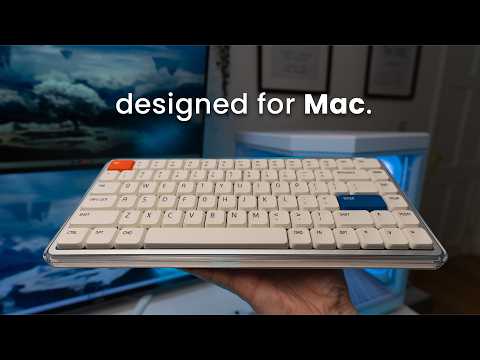
In the fast-paced digital world, MelGeek believes technology should be both efficient and a source of calm. Designed for the modern Apple user, the O2(for Mac) keyboard blends seamlessly into your minimalist setup while expressing a unique style, making every interaction a breath of fresh air.

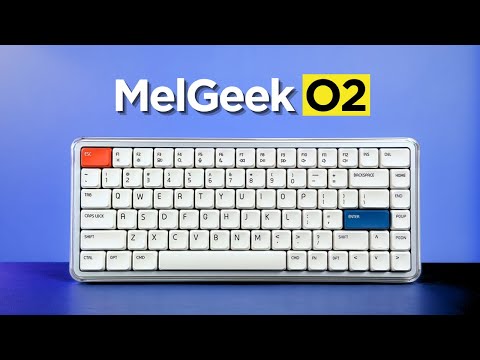
Pure, light, and essential. The O2(for Mac) captures the essence of air with a crystal-clear high-transparency frame and a sophisticated white base, artfully combining satin and gloss finishes.
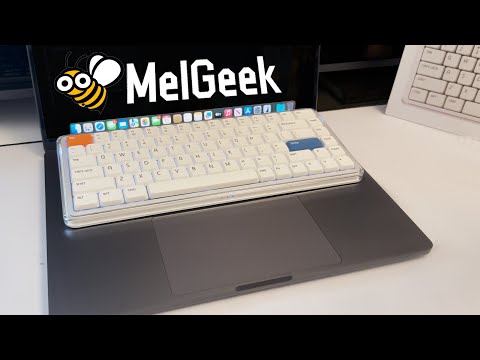
This creates a visually layered, refreshing presence that aligns perfectly with the clean aesthetic of your MacBook, brightening your desk and your workflow.

The MelGeek O2(for Mac) is crafted specifically for Mac users, delivering a seamless experience that mirrors every detail of your MacBook’s keyboard-from its sleek design to the intuitive system integration.
Every aspect, from key layout and functional zones to FN shortcuts and the subtle rounded corners of the keycaps, is meticulously matched to ensure a natural, native transition for your eyes and your fingertips.

Experience more comfort and control with MIA’s PBT keycaps-designed for low-profile switches, with a larger surface, a silky touch, and lasting durability.

Create your ideal workspace vibe with dual ambient side lights and vibrant backlighting, all featuring 16 million-color RGB effects. Effortlessly customize breathing or static lighting modes through the Hive 2.0 and instantly elevate your desk with immersive, mood-setting illumination.

The intelligent 83-key layout retains all essential functions within a reduced footprint, freeing up valuable desk space.

Its slim profile and gently rounded edges are crafted for ergonomic comfort, ensuring a natural and fatigue-free typing experience, even during long sessions.


MelGeek O2(for Mac) is engineered for a superior sensory experience. With gasket mount and exclusive switch, its advanced acoustic and suspension system delivers comfort you can feel and sound you’ll love, every day.


Co-developed by KAILH, the transparent Sunshine Switch with orange stem offers a light, smooth linear feel and a soft, cushioned sound-ideal for work and study. Compatible with over 95% of S-size mechanical keyboards (excluding magnetic switches).
O2(for Mac) Typing Sounds

Equipped with a high-performance Nordic chipset and an ultra-fast 1000Hz polling rate, O2(for Mac) ensures lightning-fast, zero-lag input-delivering a truly native typing experience for power users.
Ready to use right out of the box, the O2(for Mac) offers effortless typing, familiar shortcuts, and media controls-no learning curve required. Instantly switch between up to eight devices, from your MacBook to your iPad and iPhone, for a seamless workflow across Mac OS, Windows, and more.
For those who value both aesthetics and productivity, O2(for Mac) is the truly native keyboard that brings the Mac experience perfectly to your desktop and beyond.


Powered by a substantial 2500mAh battery, the O2(for Mac) is built to keep up with your work rhythm without constant recharging.


FREQUENTLY ASKED QUESTIONS
Is O2 for Mac designed for Mac users?
Yes, O2 for Mac is designed for Mac users who want a more familiar external keyboard experience. Its Mac-friendly key layout, functional zones, FN shortcuts, and low-profile typing feel help users move from a MacBook keyboard to a desktop setup.
What is the difference between MelGeek O2 and O2 for Mac?
MelGeek O2 and O2 for Mac share the same core typing, wireless, and low-profile keyboard experience. The main difference is the layout experience, because O2 for Mac is tuned for users who prefer Mac-style key positions and shortcut habits.
Can O2 for Mac work with Windows?
Yes, O2 for Mac can work with Windows. It is Mac-first in layout positioning, but Windows users can still use the keyboard and adjust the setup with the included replacement keycaps when needed.
Is MelGeek O2 comfortable for long typing sessions?
Yes, MelGeek O2 is designed for long typing sessions. The low-profile key height helps reduce finger travel, while the MIA PBT keycaps, gasket mount, and adjustable typing angle support a more natural daily typing experience.
Do I need MelGeek Hive to use O2 for Mac?
No, O2 for Mac can be used for normal typing without software setup. MelGeek Hive is mainly useful when you want to remap keys, adjust lighting, configure macros, or update firmware.
Does MelGeek O2 have a numpad?
No, MelGeek O2 uses an 83-key compact layout and does not include a numpad. This layout saves desk space, but users who enter numbers all day may prefer a larger keyboard.
|
Comparison |
| Color |
| Number of Keys |
| Case Material |
| Keycaps Material |
| Polling Rate |
| Switch |
| Backlighting |
| RT Precision |
| Dead Zone |
| Latency |
| Price |

O2 Tri-mode Wireless Mechanical Keyboard
$119.00
USD
Unit price
Regular price
$129.00
USD
Save $10.00
Sale price
per
|
|
Color
White
|
|
Number of Keys
83 keys
|
|
Case Material
Aluminum Alloy + PC + ABS
|
|
Keycaps Material
MIA Custom Height PBT Dye-Sublimated Keycaps
|
|
Polling Rate
1000Hz (2.4G/Wired), 125Hz (Bluetooth)
|
|
Switch
Kailh Low-profile Mechanical Switches
|
|
Backlighting
16-million Color RGB
|
|
RT Precision
/
|
|
Dead Zone
/
|
|
Latency
~2ms (2.4G/Wired), ~8ms (Bluetooth)
|
|
Price
$119.00 USD |