


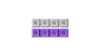





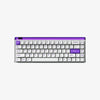


RGB mechanical keyboards transform dull desks into vibrant command centers. Blending tactile precision with "neon" aesthetics, these peripherals offer unmatched durability and customization. Whether for gaming immersion or daily typing, the right setup proves that form and function can coexist beautifully.
RGB Mechanical Keyboards Parts Explained
Switches
Under each keycap on a neon mechanical keyboard are switches. Two metal contacts underneath a key connect when the key is pushed. The five pieces of a mechanical switch are the contact blade, spring, upper and lower housing sections, and stem. Understanding how these components interact is essential when choosing the best switch types for your gaming setup.
PCB
The "brain" of the keyboard is the printed circuit board (PCB). The PCB sends the input signals from the keyboard to the linked device when a switch is pressed. Information like keyboard layout mapping is also stored by it.
Dish
The sensation of the keystrokes is influenced by the plate. This structural component is a key factor in the science behind why mechanical keyboards feel so good compared to standard membranes.
Keychains
The portion of the keyboard that rests on top of the mechanical switches is called a keycap. A keycap that is pressed causes the switch to be pushed down, so initiating the keystroke.
Example
Usually composed of laser-cut plastic, polycarbonate, or machined metal, the casing keeps everything together.
Switch plate
The switchplate is a 1.5 mm hole-perforated sheet of FR4, metal, carbon fiber, or plastic.
Common Types of RGB Mechanical Keyboards
There are several varieties of RGB mechanical keyboards, each with special features and attributes of its own. These are a few typical kinds:
Full-size RGB mechanical keyboards:
These keyboards have a conventional design with all of the keys, including navigation, function, and number pad keys. Although they offer a full typing and gaming experience, they could occupy more room on your desk.
Tenkeyless (TKL) RGB mechanical keyboards:
By doing away with the number pad, TKL keyboards have a smaller form factor. Gamers and users who want a more understated appearance without compromising necessary keys are drawn to them.
Compact/60% RGB mechanical keyboards:
Compact keyboards get rid of the function row, navigation keys, and number pad to further minimize size. Their smaller size makes them perfect for users with limited desk space or those who prefer a more portable choice. Typically, they simply include the alphanumeric keys.
Split RGB mechanical keyboards:
Split keyboards include two distinct parts that may be positioned separately to provide a more comfortable typing position for users. They let users to arrange the keyboard halves at a more comfortable angle or at shoulder width, which can assist lessen the strain on the shoulders and wrists.
RGB mechanical keyboards with configurable features:
Some RGB mechanical keyboards have programmable keys, hot-swappable switches, and RGB illumination customisation. With these keyboards, users may customize their typing.
Why Choose an RGB Mechanical Keyboard?

Especially when discussing neon mechanical keyboard, RGB (Red, Green, Blue) illumination is sometimes referred to as neon. Neon, or RGB lighting, improves typing and gaming on mechanical keyboards in the following ways:
Visual Appeal:
The keyboard gains a colorful and eye-catching aspect from the neon RGB lights.
Functionality:
Neon RGB lighting has uses beyond decoration; it may be put to good use. To emphasize crucial gaming features or offer visual signals while playing, multiple lighting profiles can be applied to particular keys or key clusters. Custom lighting profiles can increase efficiency for typists by emphasizing frequently used keys or key shortcuts.
Enhancement of Atmosphere:
The ambience of a game greatly contributes to immersion. By providing ambient lighting effects that enhance the gaming experience, neon RGB lighting may improve the ambience of gaming settings. A more seamless and engaging gaming experience may be achieved, for instance, by coordinating the keyboard illumination with in-game scenes or occurrences. Choosing keyboards with switches rated for millions of keystrokes—typically in the tens of millions—will extend the life of the device.
Build Quality:
A important factor in determining a keyboard's longevity is its overall build quality, which includes the materials used for the keycaps and chassis. Keyboards of robust construction, made of premium ABS plastic or metal, typically survive longer than those with flimsy designs. Furthermore, double-shot or laser-etched keycap keyboards are more resilient to fading and wear over time.
LED Lifespan:
RGB backlighting with LEDs is a common feature of neon mechanical keyboard. The quality of the LEDs and the way they are installed in the keyboard are two variables that affect how long these LEDs last. Longer-lasting LEDs and effective power management techniques can extend the life of the keyboard by lowering the risk of gradual LED breakdown.
Why RGB Mechanical Keyboards Can Make Gaming More Enjoyable
Here are some reasons why playing video games on an RGB Mechanical Keyboards might be more enjoyable:
RGB backlighting boosts immersion with vibrant effects synced to in-game actions:
Customizable lighting profiles may enhance the overall game experience and immersion.that are able to match gaming events. They may, for instance, alter their hues or patterns in reaction to notifications or in-game events.
Important Visibility:
In low light gaming situations, neon RGB lighting improves essential visibility. As a result, over extended gaming sessions, gamers will find it simpler to locate and press the right keys. This can be especially helpful in games where precise keystrokes are essential, such as those with intricate key bindings or fast-paced gameplay.
Elevate Your RGB Experience with MelGeek

You’ve learned how RGB lighting and premium materials like polycarbonate cases can transform a dull desk into a vibrant command center. MelGeek takes this philosophy to the next level.
Our signature transparent keyboards, such as the MelGeek MOJO84 Mechanical Keyboard, feature stunning transparent chassis designs that amplify your neon aesthetics, allowing the RGB to shine through without restriction. Combined with hot-swappable switches for durability and gasket mounts for that perfect typing sound, MelGeek offers the ideal blend of form and function discussed in this guide.
Don't just dream about the perfect "neon" setup—build it. Explore the MelGeek Collection to find the keyboard that matches your vibe.
Maintenance and Upkeep
First, disconnect the LED keyboard from the computer and disable any wireless connections.
To clean the area around the keycaps and in between the keys, use a small portable vacuum with a brush attachment or a can of pressurized air. Use caution so as not to harm the keycaps or switches.
To clean the keycaps and keyboard surface, use a soft, lint-free microfiber cloth that has been lightly moistened with water or a moderate cleaning solution (such a solution made of water and mild dish detergent). For a comprehensive overhaul, follow a step-by-step deep cleaning guide to ensure every crevice is free of debris. The keyboard's finish may be harmed by using abrasive cleaning or strong chemicals.
Particularly pay attention to places where your fingers may leave traces of filth and grease, including the keycaps and the vicinity of the WASD keys that you use most often when playing video games.
Allow it to air dry completely before plugging the keyboard back in or turning on wireless connectivity.
Problems with RGB Lighting:
Use keyboard shortcuts or the manufacturer's software (if available) to verify the RGB lighting settings on the keyboard to make sure it is switched on and configured correctly.
Using the software provided by the manufacturer or by following the directions in the user manual, reset the keyboard to its original configuration.
Should the RGB lights still not function, there could be a problem with the LED parts. For warranty assistance, get in touch with the manufacturer, or think about hiring a repair specialist.
Key Chatter or Duplicate Typing:
Mechanical problems with the key switches may give rise to key chatter or duplicate typing. Check to verify if the impacted keys reliably register many keystrokes.
If the problem continues, you might want to try cleaning the impacted switches using contact cleaner or compressed air to get rid of any dirt or debris.
Conclusion
RGB mechanical keyboards are aesthetically pleasing and highly configurable, making them a great addition to any gaming setup or workstation. The dynamic lighting effects and vivid colors give the keyboard a unique and stylish touch that improves its appearance and feel. Although aesthetics have significance, comfort and usefulness must not be sacrificed.RGB mechanical keyboards with premium key switches and ergonomic design elements need to provide a comfortable typing experience. Moreover, customizable RGB lighting can increase productivity by emphasizing crucial keys or key clusters for simpler recognition when typing.
FAQs
What makes a mechanical keyboard 'neon'?
The word "neon" in relation to mechanical keyboards usually refers to RGB (Red, Green, Blue) illumination, which produces colourful and adjustable lighting effects. When a mechanical keyboard has RGB lighting capabilities that let the user alter the color, brightness, and lighting patterns of certain keys or keyboard zones, it's referred to as a "neon" keyboard.
How long do RGB mechanical keyboards typically last?
Like any other kind of keyboard, the lifespan of a neon mechanical keyboard can vary based on a number of factors, such as usage habits, construction quality, upkeep, and environmental considerations. RGB mechanical keyboards are often made with longevity and durability in mind, especially when contrasted with membrane keyboards.
Are RGB mechanical keyboards suitable for all types of computer users?
Like other keyboard types, RGB mechanical keyboards are appropriate for a broad spectrum of computer users; nevertheless, their appropriateness may vary based on personal needs, preferences, and use habits.
How much should I expect to spend on a quality RGB mechanical keyboard?
A good neon mechanical keyboard's price might vary based on a number of variables, including switch type, construction quality, functionality, and brand. Generally, a high-quality neon mechanical keyboard will set you back $100 to $200.
What’s the difference between RGB and single-color backlit keyboards?
RGB backlighting can display multiple colors (often with effects like wave, ripple, reactive typing), while single-color backlighting usually stays one color (like white or blue) with basic brightness levels. RGB gives more customization, but single-color backlight can be simpler and sometimes uses less power.