




Popular searches
- VIVA63 Gaming Keyboard
- MelGeek x EVANGELION
- Gaming keyboard
- Magnetic keyboard

Dear Mojo68 backers,
Thanks so much for your love and support. We’ve received many comments and messages about how to pledge. Some of you may feel confused about how does it work. Here we are to help you out!
How to pledge Mojo68 on Kickstarter?
To pledge on Kickstarter, here are the detailed steps:
1. Login with your Kickstarter account( for vips :We strongly advise you to use your reservation email as your Kickstarter email account. It will be easier for us to verify your reservation! If you use a different one, you can send us your reservation email after our campaign ended.)
2.Find the project -mojo68 and click the “Back this Project” button. Then select your reward and shipping country.
Short-link :https://bit.ly/3slSimI
3.Enter your payment information. Then click the “Pledge” button and you’ll be all set.
Kickstarter won't charge your card until the END of the campaign, which means you can take advantage of reserving your Mojo68 first and think things over later.
How to know if I am a VIP or not???
check from below link :
https://mojo-68.viralmarketing.to/query
Submit your reservation email here and you will find out!!
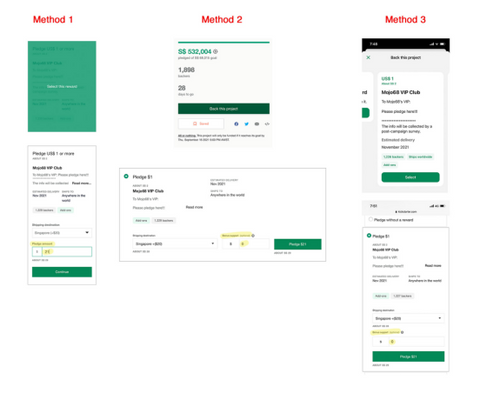
2.. For those who are not VIPs, please do not pledge this way. Otherwise, you can't process the post-campaign survey and get your reward.
3.if you wanna keycaps or numpad as add on , please click the “continue “
Add what you want in your cart
How can I change my pledge or reward grade?
Simply 2 steps:
1. Visit the project page and click the “Manage your pledge” button that appears next to your pledge amount.
2. On the next page, select "Change your pledge " and then change your pledge amount.
=====================================================================
Due to different time zones, we may not reply to your message right away. Please be patient, thanks.
Contact us if you have any questions, we are more than happy to help.
Best,
MelGeek Team
|
Comparison |
| Color |
| Number of Keys |
| Case Material |
| Keycaps Material |
| Polling Rate |
| Switch |
| Backlighting |
| RT Precision |
| Dead Zone |
| Latency |
| Price |


